remove.bg

remove.bg

remove.bg is an AI-driven service that automatically removes backgrounds from images with high precision, isolating subjects like people, products, animals, and cars. It supports bulk processing for up to 500 images per minute and integrates with tools like Figma, Photoshop, and Zapier. The platform also includes an AI background generator to create custom backdrops without prompts, making it ideal for e-commerce, marketing, and design workflows. It offers a REST API, desktop apps, and mobile support for developers and creators.

Image Generation
Visit website
Added on
Sep 16, 2026
Monthly Visits
105.6M
AI background removalOne-clickBulk processingAPIPNG/JPG/WebPZIP output
Product information

Everything worth knowing about remove.bg

The complete picture — from everyday features to the technical detail builders and IT folks dig for.

Core features

What it actually does

One-Click Background Removal
Instantly isolate subjects from any image with high accuracy, even with complex edges like hair or fur.
AI Background Generator
Create custom background scenes for your cutout subjects without writing a prompt.
Magic Brush Tool
Manually refine and touch up the edges of the background removal result.
Bulk Processing
Process up to 500 images per minute for high-volume workflows.
Technical capabilities
RESTful API with Extensive Parameters
Simple HTTP API supporting file upload, URL input, custom output resolution (up to 50MP), format selection (PNG, JPG, WebP, ZIP), and precise ROI, crop, and shadow control.
ZIP Output for Optimized Performance
Generates a ZIP file containing a color JPG and alpha matte PNG, enabling up to 80% smaller file sizes and 40% faster generation compared to PNG.
Must watch videos
Magic Background | Generate backgrounds that fit your subject | remove.bg
0:30
Tutorial0:30
Magic Background | Generate backgrounds that fit your subject | remove.bg
Say hi to remove.bg's latest feature: Magic Background. Pick a scene you like as inspiration and the AI will automatically generate a background that fits your subject perfectly - no written prompt needed. Why Magic Background? ✅ No prompt writing ✅ One-click scene matching ✅ Perfect proportions and perspective ✅ Works for products, portraits & more 🔗 Try Magic Background now at https://bit.ly/47dTDCp ------------------------------------------------------------------------------------------- Learn more about Magic Background on our blog https://bit.ly/45iSQxq Follow us on Instagram https://www.instagram.com/removebg.official/ Follow us on Tiktok https://www.tiktok.com/@remove.bg_official ------------------------------------------------------------------------------------------- #removebg #MagicBackground #AIbackground #AItools #ImageEditing #ContentCreation #ProductPhotography #EcommerceTools #BackgroundRemover #NoPromptNeeded
Remove background plugin for Photoshop | remove.bg
3:18
Tutorial3:18
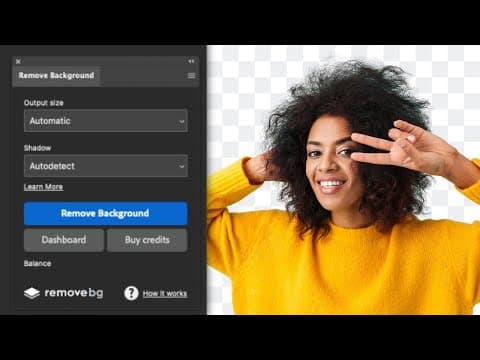
Remove background plugin for Photoshop | remove.bg
In this video, we’ll show you how to use the remove.bg plugin directly inside Adobe Photoshop to remove image backgrounds with a single click. We’ll also touch on how it compares to Photoshop’s built-in background removal feature—so you know when to use which tool. 💡 Why use the remove.bg Photoshop plugin? - One-click background removal - More precise cutouts, especially for hair & edges - Great for product photos, portraits, pets & more - Saves time when editing multiple images 📸 Working with HD images? Free accounts can process low-resolution previews, but for full HD downloads (up to 50 megapixels), you’ll need to purchase credits from remove.bg. Choose from pay-as-you-go or monthly subscription plans: https://www.remove.bg/pricing?utm_source=youtube.com&utm_medium=referral&utm_campaign=photoshop_plugin_demo&utm_content=pricing 👉 Download the plugin here: https://www.remove.bg/photoshop?utm_source=youtube.com&utm_medium=referral&utm_campaign=photoshop_plugin_demo&utm_content=download_plugin If you found this helpful, like, subscribe, and hit the bell icon for more editing tips and tutorials! #removebg #PhotoshopPlugin #BackgroundRemoval #PhotoshopTips #PhotoEditing #CreativeWorkflow #removebgplugin #PhotoshopVsRemovebg #ImageEditing #EcommerceTools
How to set up a remove.bg to Google Drive integration using Zapier
5:45
Tutorial5:45
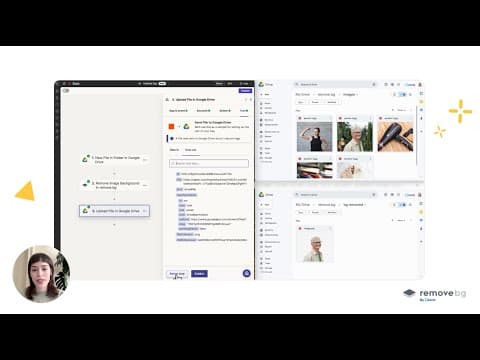
How to set up a remove.bg to Google Drive integration using Zapier
Tired of handling image edits manually? With Zapier, you can automate your entire background removal workflow using remove.bg, no coding required. In this step-by-step tutorial, you’ll learn how to set up a seamless integration between remove.bg and Google Drive. Once it’s live, all you need to do is upload your images to a Google Drive folder—your background-removed images will automatically appear in another folder, ready to use. Ideal for photographers, designers, e-commerce professionals, and anyone looking to save time and eliminate repetitive tasks from their workflow. 🔗 Try remove.bg for free: https://bit.ly/4l5N4GL 🔗 Explore remove.bg integrations on Zapier: https://bit.ly/4j4m9cx 💡 Pro tip: Go beyond Google Drive. Connect remove.bg with Dropbox, Shopify, WooCommerce, and thousands of other tools to build a fully automated creative pipeline. 📄 See all supported apps here: https://bit.ly/4j4m9cx #removebg #zapier #googledrive #automation #nocode #workflowautomation #productivity #backgroundremoval #aiintegration #bulkbackgroundremoval #imageprocessing #creativetools

Who uses it

Real use cases, no hype
E-commerce Product Listings
Automatically remove backgrounds from product photos to create clean, white, or transparent listings for marketplaces.
Professional Headshots & Portraits
Isolate subjects from cluttered or undesirable backgrounds for corporate profiles, social media, or portfolios.
Automated Graphic Design Workflow
Integrate background removal directly into design tools like Photoshop or Figma to speed up asset preparation.
Bulk Image Processing for Car Dealerships
Process hundreds of vehicle photos daily to standardize listings with consistent, clean backgrounds.
Mobile Content Creation
Use the mobile app to quickly edit photos on-the-go for instant social media posts or messaging.
API-Powered Application Integration
Build custom tools or add background removal as a feature in your own app using the simple HTTP API.
What's great
  • One-click, accurate background removal for complex subjects like hair and fur
  • Excellent integration ecosystem (Photoshop, Figma, Zapier, API)
  • Fast processing, up to 500 images per minute for bulk workflows
Technical strengths
  • Simple HTTP REST API with clear documentation and multiple code samples
  • Supports high-resolution outputs up to 50 megapixels with flexible formats (PNG, JPG, WebP, ZIP)
  • Advanced API parameters for fine-tuning: ROI, cropping, scaling, positioning, and shadow generation
Where it falls short
  • Free tier is severely limited (1 preview credit per image)
  • Credits are required for any quality output; no true free unlimited use
  • ZIP format for optimal performance requires extra integration/composition step
Technical limitations
  • PNG transparency limited to 10 megapixels; higher resolutions require other formats
  • API does not natively support video; requires separate Unscreen service
  • Future migration to Leonardo.ai platform adds potential integration complexity
For technical folks

The deep-dive specs

API Endpoint
https://api.remove.bg/v1.0/removebg
Max Input Resolution
50 Megapixels
Output Formats
PNG, JPG, WebP, ZIP (with alpha matte)

FAQ

Includes technical Q&A
Credits are the currency for using remove.bg's features. Preview (small) results cost 0.25 credits, while full-resolution results cost 1 credit. Credits can be purchased as a subscription or pay-as-you-go.

Traffic Insights

Monthly Visits

105.6M

October 2026

Growth Rate

0%

vs last month

Dominance

0%

in Image Generation

Top Country

Bangladesh

43% of traffic

Top Countries Breakdown

Bangladesh
43%
India
9%
United States
9%
Brazil
5%
Indonesia
3%

Growth Trend

Stable

Traffic has remained stable.

Honest pricing

No sneaky tiers, no “contact sales”

Here's who each plan is actually for — and where the hidden charges might hit.

Free
Free

Individuals

  • 1 trial credit for AI edits
  • Basic features
  • API and integrations included
Subscription
Most picked
$9/mo

Individuals

  • 40 credits per month
  • AI Photo editor
  • Remove background
  • AI background
  • Erase & restore
  • Max quality exports
  • Automation
Pay-as-you-go
$1/mo

Individuals

  • 3 credits
  • One-off purchase
  • Credits expire Dec 1
  • 2026
Enterprise
Custom

Enterprise

  • Starts at 100
  • 000 images per year
  • Custom volume
  • Flexible API
  • credits
  • rate limit
  • Best price
View Full Plans & Pricing on remove.bg

Official pricing, checkout, and plan upgrades are handled directly on remove.bg.

Reviews

What the internet actually thinks

Data refreshed weekly. No paid placements.

Trustpilot
Not reviewed yet
G2
G2
Not reviewed yet
C
Capterra
Not reviewed yet
Product Hunt
Not reviewed yet
COMMUNITY COMMENTS

Leave a Comment

Help others make informed decisions. Your honest feedback shapes the community's understanding of this tool.

Tips for commenting

  • •Be specific about features you used
  • •Share real use cases and results
  • •Mention both pros and cons
  • •Keep it honest and constructive
to leave a comment

Your comment is published immediately.

Filter:
Sort:

No comments yet

Be the first to share your experience with this tool.

Alternatives

Not quite the right fit?

Here's what else is out there.