Scenario

Scenario

Scenario is a creative AI platform built for production teams. It aggregates 750+ models from 50+ providers across image, video, 3D and audio in one workspace, and lets you train custom models on your own art so characters and styles hold from shot to shot. Chain models and tools on a node canvas, save the chain as a workflow, and publish it as an app anyone on the team can run with cost shown upfront. A Node Agent turns a brief into a working graph, Genie picks models and fills forms, and Scenario MCP or the REST API with TypeScript/Python SDKs drops generation into your own pipeline. Aimed at game studios, animation, advertising and enterprise creative teams that need consistent, style-locked assets at scale — with spend caps and approved model lists at the Enterprise tier.

Design & Creative
Visit website
Added on
Nov 4, 2026
Image genVideo gen3D genAudio genCustom modelsNode workflowsAI agentsMCP & APIBlender plugin750+ models
Product information

Everything worth knowing about Scenario

The complete picture — from everyday features to the technical detail builders and IT folks dig for.

Core features

What it actually does

Unified creative workspace
Browser-based app that runs image, video, 3D and audio generation in one place. Compare models on the same brief and anchor output with your own references and trained models.
Custom model training
Train a model on your own art when a project needs a style no reference can hold. Keeps characters and assets on-style from shot to shot.
Node workflows published as apps
Chain models and tools on a canvas, save the chain as a workflow, and publish it as a simple form anyone on the team can run. Cost is shown before the run.
Agents that build the pipeline
Node Agent turns a brief into a working node graph and runs it. Genie, the assistant on every page, picks models and fills forms. Both follow team instructions and, on Enterprise, spend caps and approved models.
Technical capabilities
MCP, REST API and SDKs
Connect Claude Code, Codex or Cursor through Scenario MCP, or call models and saved workflows from your own pipeline via the REST API with TypeScript and Python SDKs.
750+ models from 50+ providers
Google, OpenAI, Bytedance, Kuaishou, Runway, ElevenLabs, BFL, Luma, MiniMax, Alibaba, Tencent, Meshy, Tripo, Ideogram, xAI and more, all in the same workspace as your references and workflows.
Blender plugin and DCC skills
Experimental Scenario Blender plugin brings image, video, 3D and materials into the viewport. Open-source skills help agents drive Blender, Maya, ZBrush, Unreal and Unity.
Must watch videos
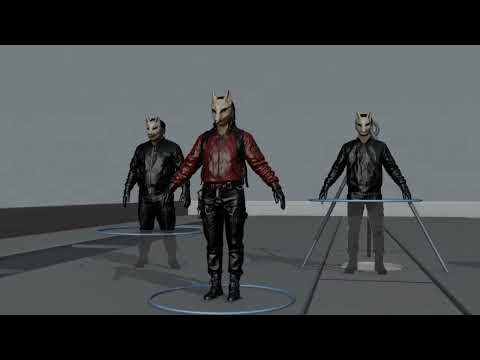
Introducing Scenario Blender plugin
1:19
Tutorial1:19
Introducing Scenario Blender plugin
Scenario is now inside Blender. Generate images, video, 3D models, PBR materials, audio and 360 environments right from your scene. Get started: https://www.scenario.com/campaign/blender?utm_source=youtube&utm_medium=video&utm_campaign=blender The Scenario Blender plugin is open source. Use scene captures and selected meshes as inputs, turn a written scene description into a greybox layout with Blockout, and render stills or video from your viewport. You can also connect Claude Code, Codex or Cursor to your open scene through the plugin’s local MCP server. LINKS Scenario for Blender: https://www.scenario.com/campaign/blender?utm_source=youtube&utm_medium=video&utm_campaign=blender GitHub (source code and releases): https://github.com/scenario-labs/blender-plugin Plugin site and guide: https://blender.scenario.com Get your API key: https://docs.scenario.com/get-started/documentation/quick-start-guide/step-1-obtain-your-api-key Connect an agent (MCP): https://mcp.scenario.com/docs SETUP You need Blender 5.0 or later and a Scenario account. In Blender, open Edit → Preferences → System → Network and turn on Allow Online Access. Open Edit → Preferences → Get Extensions → Repositories, choose Add Remote Repository and paste: https://blender.scenario.com/repo/index.json Find Scenario in Get Extensions and install it. In Scenario, open Organization settings → API Keys → Add API Key. Back in Blender, open Edit → Preferences → Add-ons → Scenario, paste your key and secret, then press Test connection. In the 3D viewport, press N and open the Scenario tab. Installing from the repository means Blender offers you updates. Prefer a ZIP? Download it from the GitHub releases page and drag it onto a Blender window. Every generation shows its credit estimate before you press Generate. #Blender #b3d #gamedev
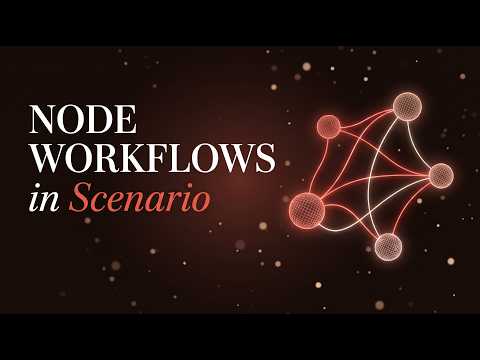
Introducing Scenario Nodes | Build & Share AI Workflows
5:03
Tutorial5:03
Introducing Scenario Nodes | Build & Share AI Workflows
Welcome to this tutorial on Scenario Nodes, our node-based workflow engine. Nodes lets you chain models and assets into visual workflows inside a single connected canvas. Instead of jumping between tools or repeating steps, you can run an entire pipeline at once, control individual stages, and reuse it whenever you need. In this video we cover: • The Node Editor and interface • Platform Workflows (ready-made pipelines) • Character Fusion • Ad Creative Studio • Building a workflow from scratch • Creating and styling a video • Running specific nodes or the full workflow • Turning a workflow into a shareable App Scenario Nodes supports both real-world content and game assets, across image, video, and 3D use cases. Workflows save automatically and can be reused, edited, or shared with your team. Try Scenario: https://scenario.com Timestamps: 0:00 Introduction to Scenario Nodes 0:26 Opening the Node Editor 0:53 Platform Workflows 1:12 Character Fusion workflow 1:45 Ad Creative Studio 2:13 Building a workflow from scratch 2:58 Creating the video input 3:25 Styling the final video 3:59 Running specific nodes 4:13 Turning workflows into Apps 4:32 Reusing and sharing workflows 4:58 Outro #AI #Nodes #AIWorkflows #VisualWorkflow #NodeEditor #GenerativeAI #AITools #ContentCreation #AIVideo #AIImages #NoCodeAI #GameAssets #MarketingCreative #WorkflowAutomation #AICreation
How to Edit Any Video with Scenario
3:20
Tutorial3:20
How to Edit Any Video with Scenario
Learn how to edit and transform any video, generated or real, using Scenario’s powerful AI video tools. In this tutorial, you’ll discover how to modify scenes, restyle visuals, animate characters, reframe footage, and replace subjects with just a few clicks or prompts. Try Scenario now: https://app.scenario.com/ Watch more tutorials: https://youtu.be/T8G73YoblQA?si=9JWheFhe1XwkFqr1 https://youtu.be/aQZpeeLUXWs https://youtu.be/v5mTB-Bggio Don’t forget to subscribe for more Scenario tutorials! Timestamps: 0:00 – Welcome to this tutorial on video editing in Scenario 0:04 – Edit and transform any video with powerful AI models 0:11 – Modify scenes, characters, add effects, or restyle visuals 0:23 – One-click or prompt-based video editing made easy 0:28 – Starting your project: Create → Videos 0:33 – Overview of video editing models (RunwayF, Luma Modify, Luma Reframe, 1-2.2) 0:44 – Example: Using Runway OF 0:47 – Understanding video context with Runway OF 0:51 – Upload or drag in your video 0:54 – Set your aspect ratio 0:57 – Add reference images and write your prompt 1:03 – Example prompt: Turn the surroundings into a desert oasis 1:08 – Explore scene transformations, relighting, and camera angles 1:17 – Introducing 1-2.2 Animate (Move & Replace modes) 1:24 – Animate a static image or replace subjects in a video 1:34 – Upload video + image example (soldier → futuristic character) 1:44 – The model handles substitution automatically 1:46 – Replace model: seamless subject swaps 1:54 – Reframing / Outpainting overview 1:59 – Extend the frame or change aspect ratio 2:08 – Luma Reframe for expanding your shot 2:11 – Upload clip, choose output ratio, and add a guiding prompt 2:22 – Example prompt: Extend the scene to reveal more asteroids 2:27 – Turn first frame into a guiding prompt 2:34 – Natural, seamless scene expansion 2:44 – Perfect for adapting videos across formats 2:48 – 1-2.2 Reframe & Outpainting alternatives 2:56 – Explore tones, environments, and lighting setups 3:08 – Fast, flexible, cinematic or social-ready editing 3:17 – Outro – Thanks for watching #AIEditing #ScenarioAI #Aleph #LoRA #StylizedAssets #GameDev #AIArt #Tutorial

Who uses it

Real use cases, no hype
Game Asset Production
Generate and iterate characters, props, textures and icons on-style.
Style-Consistent Art Pipelines
Train custom models on studio art to hold a look across shots.
Storyboard to Video
Turn boards into shots, restyle footage and extend takes.
3D Prototyping
Convert one image into a textured 3D model for engine tests.
Workflow Automation
Publish node chains as simple team-facing apps with cost preview.
API/MCP Integration
Call models and saved workflows from code or AI assistants.
Enterprise Creative Ops
Apply spend caps, approved models and per-user API keys.
What's great
  • Huge 750+ model catalog across image, video, 3D and audio
  • Train custom models on your own art for style consistency
  • One workspace for models, references, workflows and assets
  • No-code workflows and agents let teams run complex chains
Technical strengths
  • TypeScript/Python SDKs plus REST API for pipeline calls
  • Workflow canvas shows cost preview before runs
  • Webhooks, CDN and per-user API keys support production apps
Where it falls short
  • Credit/compute costs can balloon on video and 3D runs
  • 750+ model catalog is overwhelming to choose from
  • Node graph and workflow setup has a real learning curve
  • Outputs still need human cleanup for production quality
Technical limitations
  • Custom model quality depends on tight, clean training data
  • Provider rate limits and queues can slow batch jobs
  • Debugging chained multi-model workflows is non-trivial
For technical folks

The deep-dive specs

Model library
750+ models from 50+ providers
API
REST API with TypeScript and Python SDKs
MCP
Scenario MCP for Claude Code, Codex and Cursor
DCC integrations
Blender plugin (experimental); open-source skills for Maya, ZBrush, Unreal and Unity
Platform extensibility
Webhooks, CDN, per-user API key provisioning, NSFW handling and search

FAQ

Includes technical Q&A
Scenario is a creative AI platform for production teams. It runs image, video, 3D and audio generation in one workspace, with custom model training, node workflows, agents, API and MCP access.

Traffic Insights

Monthly Visits

—

November 2026

Growth Rate

0%

vs last month

Dominance

0%

in Design & Creative

Top Country

—

Top Countries Breakdown

—

Growth Trend

Stable

Traffic has remained stable.

Pricing overview
Freemium Pricing

Scenario Pricing

Scenario uses a freemium pricing structure. Real-time rates, custom enterprise quotas, and plan details are managed directly on their official platform.

Check Pricing on Scenario
Reviews

What the internet actually thinks

Data refreshed weekly. No paid placements.

Trustpilot
Not reviewed yet
G2
G2
Not reviewed yet
C
Capterra
Not reviewed yet
Product Hunt
Not reviewed yet
COMMUNITY COMMENTS

Leave a Comment

Help others make informed decisions. Your honest feedback shapes the community's understanding of this tool.

Tips for commenting

  • •Be specific about features you used
  • •Share real use cases and results
  • •Mention both pros and cons
  • •Keep it honest and constructive
to leave a comment

Your comment is published immediately.

Filter:
Sort:

No comments yet

Be the first to share your experience with this tool.

Alternatives

Not quite the right fit?

Here's what else is out there.