Kittl

Kittl

Kittl is an all-in-one AI creative suite that empowers designers, sellers, and businesses to produce standout branding and product visuals. It combines an advanced vector and image editor with integrated AI generation tools for images, vectors, and video, plus mockup creation, background removal, and upscaling. The platform is built for professionals who want to enhance, not replace, their creative process. Key capabilities include AI Workflows for merch and marketing, a vector editor with infinite canvas, real-time team collaboration, and a vast library of over 100 million curated assets like templates, fonts, and graphics. It targets designers, brand managers, e-commerce sellers, and marketing agencies needing to scale visual content production.

Design & Creative
Visit website
Added on
Sep 18, 2026
Monthly Visits
3.1M
AI Image GenerationVector Graphics EditorVideo GenerationMockup ToolCollaborationMulti-Model AITemplate Library
Product information

Everything worth knowing about Kittl

The complete picture — from everyday features to the technical detail builders and IT folks dig for.

Core features

What it actually does

AI Creative Suite
Generate images, vectors, and videos from prompts. Includes tools like AI Workflows, Agentic AI, and background removal.
Vector Editing & Design
Create and edit scalable vector artwork with pen tools, shape builders, and a suite of vector-specific features.
Templates & Assets
Access 10,000+ premium templates, 1M+ photos, graphics, fonts, and professional mockups for branding and products.
Collaboration & Workspace
Create together in real-time with team collaboration features and an infinite canvas.
Technical capabilities
Multi-Model AI Integration
Supports a curated list of models including Flux, Imagen 4, Seedream, Ideogram, and DALL-E 3 for diverse output.
Must watch videos
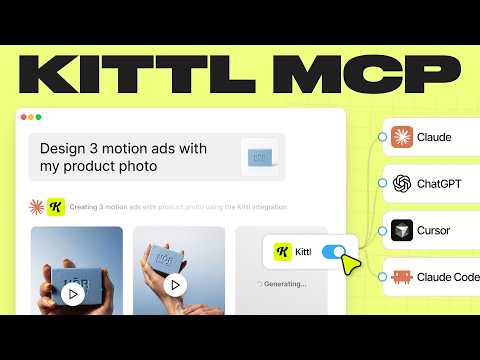
Connect Kittl To Claude, ChatGPT, and More! (MCP Demo)
2:43
Tutorial2:43
Connect Kittl To Claude, ChatGPT, and More! (MCP Demo)
👉 Learn About Kittl MCP: https://kit.tl/mcp 👉 Kittl MCP Token: https://mcp.kittl.com/mcp 👕 Check Out Our Kittl Merch! www.kittlmerch.com 🎟️ Use Promo Code KITTLONYT25 To Get 25% Off A Pro Subscription!* You can now connect Kittl to your favorite workspace, whether that's Chat GPT, Claude, Cursor, and other MCP clients so that you can make graphics, mockups, videos, and more! It's easy to connect and get started. Be sure to check out these other helpful details below.👇 🎟️ *Promo Code Details Promo Codes apply to first time subscribers only. 25% Coupon code will apply to either monthly or yearly plans for the first time payment only. (Either your first month, or first full year). 🎥 Watch These Kittl Tutorials: ↪︎New Mockup Workflows: https://youtu.be/2eXYxEH_dFU?si=_Gl-6f6JHMcQR3Ei ↪︎Kittl UI Updates: https://youtu.be/VYKToM7lFqE?si=SKVHDAgQjDjPdPRf 👥Join the Kittl Discord Group! ↪︎https://kit.tl/discord 📱 Follow Kittl On Social: https://www.instagram.com/kittldesign https://www.tiktok.com/@kittldesign https://www.facebook.com/kittldesign https://www.pinterest.com/kittldesign https://www.twitter.com/kittldesign https://www.kittl.com 🔴 Subscribe to @Kittl ↪︎https://www.youtube.com/kittldesign Thank you so much for using our platform, and for watching this video. Don't forget to subscribe and follow along with the tutorial on the channel. If there is anything I missed, or if you have more questions, drop a comment below and we will respond asap! Let me know more tutorial ideas as well! #kittl #graphicdesign
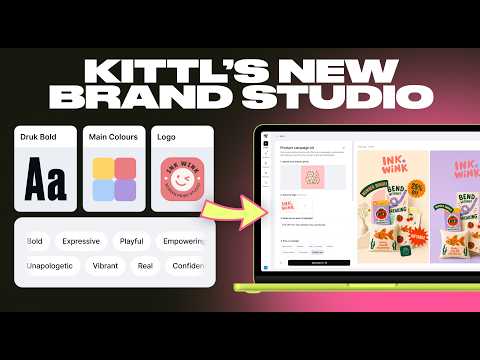
Every Business Owner Needs This Brand Guide Tool
14:12
Tutorial14:12
Every Business Owner Needs This Brand Guide Tool
👉 Start Using Brand Studio: https://kit.tl/brandstudio 🎟️ Use Promo Code KITTLBRAND To Get 50% Off Annual Plans!* 👕 New Kittl Merch! www.kittlmerch.com In this video, we're showing you how to import and edit your brand using Kittl's new Brand Studio feature. It's super easy to drop in your URL, import your logos, colors, graphics, and fonts, and then apply your style to incredible workflows for mockups, ads, and more. Be sure to check out these other helpful details below.👇 🎟️ *Promo Code Details Limited Time Offer. Valid through end of Sept 2026. Applies for 1 user per annual plan. 🎥 Watch These Kittl Tutorials: ↪︎New Mockup Workflows: https://youtu.be/2eXYxEH_dFU?si=_Gl-6f6JHMcQR3Ei ↪︎Kittl UI Updates: https://youtu.be/VYKToM7lFqE?si=SKVHDAgQjDjPdPRf 👥Join the Kittl Discord Group! ↪︎https://kit.tl/discord 🕰️ Timestamps For This Video: 0:00 Intro 1:00 Importing Your Website To Brand Studio 2:00 Editing Logos 2:20 Editing Color Palettes 3:00 Editing Your Fonts 4:10 Editing Brand Graphics 5:00 Editing Tone and Voice 6:00 Using On Brand Graphics 8:20 How To Edit Workflow Graphics 9:30 Accessing Your Brand In the editor 10:30 Using Agentic To Make Variations 📱 Follow Kittl On Social: https://www.instagram.com/kittldesign https://www.tiktok.com/@kittldesign https://www.facebook.com/kittldesign https://www.pinterest.com/kittldesign https://www.twitter.com/kittldesign https://www.kittl.com 🔴 Subscribe to @Kittl ↪︎https://www.youtube.com/kittldesign Thank you so much for using our platform, and for watching this video. Don't forget to subscribe and follow along with the tutorial on the channel. If there is anything I missed, or if you have more questions, drop a comment below and we will respond asap! Let me know more tutorial ideas as well! #kittl #workflows #aiworkflow #aiworkflows
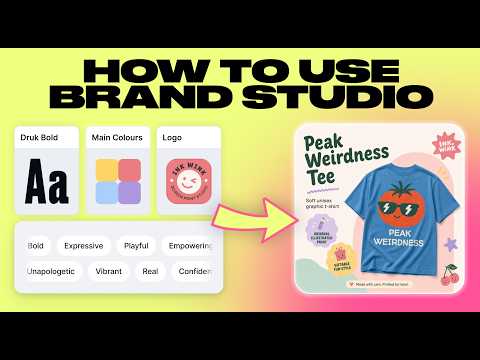
How To Use Kittl's Brand Studio Feature (Walkthrough)
8:07
Tutorial8:07
How To Use Kittl's Brand Studio Feature (Walkthrough)
👉 Try Brand Studio Now: https://kit.tl/brandstudio 🎟️ Use Promo Code KITTLBRAND To Get 50% Off A Pro Subscription!* 👕 Check Out Our Kittl Merch! www.kittlmerch.com In this video, Drew is walking you through how to use the new Brand Studio feature in Kittl, where you can upload your logos, colors, fonts, all from just inserting your URL link, or starting from scratch. Learn how to implement your brand, edit the components, and create marketing assets quickly. Be sure to check out these other helpful details below.👇 🎟️ *Promo Code Details Valid for all annual plans through September 30th 2026. One redemption per account only. 🎥 Watch These Kittl Tutorials: ↪︎New Mockup Workflows: https://youtu.be/2eXYxEH_dFU?si=_Gl-6f6JHMcQR3Ei ↪︎Kittl UI Updates: https://youtu.be/VYKToM7lFqE?si=SKVHDAgQjDjPdPRf 👥Join the Kittl Discord Group! ↪︎https://kit.tl/discord 🕰️ Timestamps For This Video: 0:00 Intro 0:30 How To Import Your Brand 1:15 Editing Parts Of Your Brand 2:50 Editing Your Tone Of Voice 3:25 Applying Your Brand To Graphics 5:15 Editing AI Graphics 📱 Follow Kittl On Social: https://www.instagram.com/kittldesign https://www.tiktok.com/@kittldesign https://www.facebook.com/kittldesign https://www.pinterest.com/kittldesign https://www.twitter.com/kittldesign https://www.kittl.com 🔴 Subscribe to @Kittl ↪︎https://www.youtube.com/kittldesign Thank you so much for using our platform, and for watching this video. Don't forget to subscribe and follow along with the tutorial on the channel. If there is anything I missed, or if you have more questions, drop a comment below and we will respond asap! Let me know more tutorial ideas as well! #kittl #brand #branding #brandidentity #brandkit

Who uses it

Real use cases, no hype
E-commerce Product Mockups
Generate studio-quality product shots and mockups for listings on Etsy, Shopify, etc.
Merch & Print-on-Demand Design
Create unique T-shirt, hoodie, and poster designs using AI and vector tools for production.
Brand Identity & Logo Creation
Develop complete brand kits, logos, business cards, and marketing collateral.
Social Media & Ad Campaigns
Produce scroll-stopping ads, banners, and video content for digital marketing.
Quick Asset Generation & Refinement
Use AI to brainstorm ideas, then upscale, vectorize, or remove backgrounds for final assets.
Packaging & Label Design
Design product packaging, tags, and labels with AI-assisted layouts and text effects.
Video Content Creation
Turn static designs into animated videos and motion graphics for promotions.
What's great
  • All-in-one platform for AI generation, editing, and vector tools
  • Strong template library for merch, marketing, and branding
  • Includes AI video generation and animation tools
  • Real-time collaboration and team workspaces
Technical strengths
  • Massive AI model library (Flux, Imagen, DALL-E 3, etc.)
  • Integrates AI directly into a professional design canvas
  • Built-in vectorizer, background remover, and upscaler
Where it falls short
  • AI credit/token system can be confusing and limiting
  • Free plan is severely limited (5 projects, 100 one-time tokens)
  • Complex workflows can consume credits quickly
  • Web-based only, no native desktop application
Technical limitations
  • Highest-tier AI models locked behind Expert plan
  • Advanced vector editing might not match dedicated CAD/Illustrator depth
  • Output consistency can vary between different AI models
For technical folks

The deep-dive specs

FAQ

Includes technical Q&A
Tokens are consumed when you use AI generation features (image, vector, video). The free plan gives 100 one-time tokens. Pro plans grant monthly allocations (e.g., 2,000/mo). Different operations consume different amounts.

Traffic Insights

Monthly Visits

3.1M

November 2026

Growth Rate

0%

vs last month

Dominance

0%

in Design & Creative

Top Country

United States

29% of traffic

Top Countries Breakdown

United States
29%
Bangladesh
13%
United Kingdom
6%
Brazil
5%
India
5%

Growth Trend

Stable

Traffic has remained stable.

Honest pricing

No sneaky tiers, no “contact sales”

Here's who each plan is actually for — and where the hidden charges might hit.

Free
Free

Users

    Pro
    $15/mo

    Users

      View Full Plans & Pricing on Kittl

      Official pricing, checkout, and plan upgrades are handled directly on kittl.com.

      Reviews

      What the internet actually thinks

      Data refreshed weekly. No paid placements.

      Trustpilot
      Not reviewed yet
      G2
      G2
      Not reviewed yet
      C
      Capterra
      Not reviewed yet
      Product Hunt
      Not reviewed yet
      COMMUNITY COMMENTS

      Leave a Comment

      Help others make informed decisions. Your honest feedback shapes the community's understanding of this tool.

      Tips for commenting

      • •Be specific about features you used
      • •Share real use cases and results
      • •Mention both pros and cons
      • •Keep it honest and constructive
      to leave a comment

      Your comment is published immediately.

      Filter:
      Sort:

      No comments yet

      Be the first to share your experience with this tool.

      Alternatives

      Not quite the right fit?

      Here's what else is out there.