LTX Studio

LTX Studio

LTX Studio is an all-in-one generative AI platform for video production, designed to streamline the entire workflow from concept to final cut. It offers a suite of AI-powered tools including text-to-video, image-to-video, audio-to-video, AI storyboarding, script-to-video, and advanced video editing features like camera control, keyframing, and style presets. The platform is built for creative professionals, teams, and enterprises to produce high-quality videos, ads, movies, and other visual content. Powered by the open-source LTX-2 model, it provides both a web-based creative studio for visual story development and a developer-focused API for programmatic video generation with synchronized audio. Target users include filmmakers, advertising agencies, brand studios, TV networks, and in-house creative teams looking to accelerate production with AI.

Video Generation
Visit website
Added on
Sep 19, 2026
Monthly Visits
160.4K
AI Video GenerationText-to-VideoImage-to-VideoAudio-to-VideoStoryboardingConsistent CharactersAPI AccessLTX-2.5 Model
Product information

Everything worth knowing about LTX Studio

The complete picture — from everyday features to the technical detail builders and IT folks dig for.

Core features

What it actually does

Text-to-Video Generation
Generate video with synchronized audio from text prompts, supporting up to 4K resolution and 20-second clips.
Image-to-Video Animation
Animate still images with realistic motion, depth, and audio, preserving the source visual identity.
Audio-to-Video Synthesis
Create video visuals synchronized to an audio track like dialogue, music, or ambient sound.
AI Storyboard Generator
Automatically generate scene storyboards from text concepts or scripts.
Consistent Elements System
Maintain visual consistency for AI-generated characters, objects, and locations across scenes.
Technical capabilities
Async and Sync API Endpoints
Choose between a synchronous API returning video in one call or an async API for polling-based production workflows.
LTX-2.5 Model Architecture
Powered by the LTX-2.5 multimodal video generation model, an evolution of the LTX-2 open-source architecture.
Must watch videos
LTX-2.5 in ComfyUI: The Upgrade Guide
10:18
Tutorial10:18
LTX-2.5 in ComfyUI: The Upgrade Guide
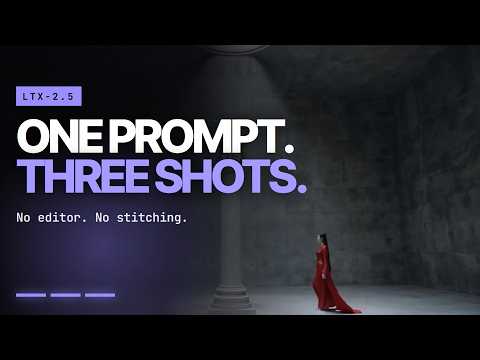
This is the LTX-2.5 upgrade guide. If you already run LTX-2.3 in ComfyUI, on a CLI, or with a LoRA you trained yourself, we’ll answer the three questions you probably have: what changed, what you have to redo, and what is worth trying first. We walk the same workflow you already know, swap in the 2.5 checkpoint and the Gemma 4 encoder, and show what happens to prompts you already wrote. The walkthrough covers native multi-shot prompting and the two rules that make it work, carrying the action through the cut and naming your subject the same way in every shot. Then a same seed and same sampler comparison against 2.3 to show where it stops holding a coherent shot list, the Gemma 3 to Gemma 4 text encoder and what happens when you ask for five things at once, the prompt enhancer turning one sentence into 760 characters and the negative prompt it never touches, the two decoders 2.5 ships with and the kind of footage where the difference actually shows, and Diffusion Fidelity Rendering, which plants a full-detail keyframe about once a second and drops them before export. On the migration question, no retraining. Your 2.3 LoRAs load against a 2.5 checkpoint at a default strength of 1.2. We close on Hugging Face gating and the 403 that catches most people, the new split pack, and why bf16 and int8 setups should never be mixed. This is for ComfyUI users, filmmakers, and technical creators with an LTX-2.3 workflow already running who want to move to 2.5 without rebuilding from scratch. Get started: GitHub: https://github.com/Lightricks/ComfyUI-LTXVideo HuggingFace: https://huggingface.co/Lightricks/LTX-2.5 Documentation: https://docs.ltx.video 00:00 - 00:29 Intro: One Prompt, One Generation, Not an Edit 00:29 - 00:56 The Three Questions This Upgrade Answers 00:56 - 01:17 Native Multi-shot: There Is No Multi-shot Flag 01:17 - 02:04 Carry the Action Through the Cut, Name Your Subject Every Time 02:04 - 02:35 Same Prompt Skeleton, Completely Different World 02:35 - 03:16 Same Seed, Same Sampler: LTX-2.3 vs LTX-2.5 03:16 - 04:00 Gemma 3 to Gemma 4: All Five Asks Survived 04:00 - 04:27 The Prompt Enhancer and the Negative Prompt It Never Touches 04:27 - 05:25 Two Decoders: Diffusion, Convolutional, and Where You See It 05:25 - 05:59 Do You Have to Retrain? Your 2.3 LoRAs Load on 2.5 05:59 - 06:54 Auto Duration and Diffusion Fidelity Rendering 06:54 - 07:40 Why One Latent Token Covers Eight Frames 07:40 - 08:28 Hidden Keyframes: The Storyboard the Model Builds for Itself 08:28 - 08:48 Standard Path vs DFR: Watch It Move 08:48 - 09:12 Gated Repos, 403 Errors, and IC-LoRA Access 09:12 - 09:37 The Split Pack and Why Your Old Download Commands Break 09:37 - 10:06 bf16 or int8: Neither Is Wrong, Do Not Mix Them 10:06 - 10:18 Final Thoughts 🔷 Join our Discord Community: https://discord.com/invite/ltxplatform 🔷 Follow us on X: https://x.com/ltx_io 🔷 Follow us on Instagram: https://www.instagram.com/ltx.io/ About LTX LTX builds open world models: AI that understands and generates physical reality across video, audio, and multimodal inputs. Open, efficient, and yours to own. Run on your own hardware and fine-tune on your own IP, with 18M+ downloads and no vendor lock-in. 🔔 Subscribe for more LTX model releases, open-source tools, training guides, and developer resources.
LTX x ComfyUI | From Idea to Pipeline
2:47
Tutorial2:47
LTX x ComfyUI | From Idea to Pipeline
@comfyorg builds for people who want to own their pipeline end to end. No waiting on a roadmap. No renting access by the call. Just a graph you wire yourself and control you keep. That's the belief driving how ComfyUI works with LTX. Our models stay open, so Comfy's graph updates as they evolve, and builders never lose control of their own workflow.
LTX x Fal | A Model You Can Actually Control
1:36
Tutorial1:36
LTX x Fal | A Model You Can Actually Control
@fal.ai.official doesn't bet on the model with the best demo. It bets on the one people won't stop building on. LTX made that cut. Eighty different fine-tunes of LTX run live on Fal's platform today. That's what open actually gets you. Real, deployable models you can retrain, not a sealed system you only get to call. Fal's CTO calls it the real test of an open model, whether the ecosystem keeps growing after launch.

Who uses it

Real use cases, no hype
Commercial Ad Production
Generate high-impact video ads from concept to final cut, maintaining brand consistency for campaigns.
Film Pre-visualization & Storyboarding
Create dynamic storyboards and visual concepts from scripts to plan shots and sequences.
Music Video Creation
Produce synchronized music videos by generating visuals driven by an audio track.
Content Marketing & Social Media
Rapidly prototype and generate short-form video content for platforms like TikTok and Reels.
Creative Iteration & Refinement
Use retake and extend tools to iteratively edit and perfect specific sections of a video.
Brand Asset Generation
Maintain visual consistency across marketing materials with AI Characters, Objects, and Locations.
Indie Filmmaking & Prototyping
Empower solo creators to visualize and produce short films or series from a simple concept.
What's great
  • End-to-end video production platform: script to final cut.
  • Consistent characters and elements across scenes.
  • Powerful suite of AI tools for storyboarding, editing, and generation.
  • Web-based with no downloads required.
Technical strengths
  • Open-source LTX-2 model with full weights and training framework.
  • Advanced API for programmatic control: retake, extend, reframe, async jobs.
  • Seamless integration of third-party models (VEO, Kling, Flux, etc.).
Where it falls short
  • Credit-based pricing can become expensive for heavy usage.
  • Desktop-only, no mobile app available.
  • Free plan is severely limited (800 one-time credits).
  • Complex features may have a steep learning curve for beginners.
Technical limitations
  • Generations are not real-time; requires waiting for processing.
  • Control over model architecture is limited to API parameters.
  • Enterprise features like SSO and compliance are gated behind high tiers.
For technical folks

The deep-dive specs

FAQ

Includes technical Q&A
Yes, LTX offers a free plan with 800 one-time credits to get started. For more features and credits, you can upgrade to paid plans starting at $15/month.

Traffic Insights

Monthly Visits

160.4K

November 2026

Growth Rate

0%

vs last month

Dominance

0%

in Video Generation

Top Country

United States

47% of traffic

Top Countries Breakdown

United States
47%
India
9%
Turkey
6%
Brazil
4%
Germany
4%

Growth Trend

Stable

Traffic has remained stable.

Honest pricing

No sneaky tiers, no “contact sales”

Here's who each plan is actually for — and where the hidden charges might hit.

Free
Free

Individuals

  • 800 credits (one time)
  • Image and video generation
  • LTX-2.5 video model
  • LTX-2.3 video model
  • Z-image image model
  • Advanced camera controls
  • Blank Storyboards
Lite
$15/mo

Individuals

  • 8000 credits/month
  • Everything in Free plus...
  • Image and video upscales
  • Editing tools
  • No watermarking
  • UNLIMITED FLUX.2 GENERATIONS.
Standard
Most picked
$35/mo

Teams

  • 28000 credits/month
  • Everything in Lite plus...
  • 800 additional Computing Seconds/month for the first 3 months
  • Nano Banana 2 and Pro image models
  • FLUX.2 Pro image model
  • Kling 2.6 Pro video model
Pro
$125/mo

Professionals

  • 110000 credits/month
  • Everything in Standard plus...
  • Veo 3.1
  • Veo 3.1 Fast
  • Veo 3.1 Lite generation models
  • Maximum quality & control
Enterprise
Custom

Enterprise

  • Custom credit volume
  • Everything in Pro plus...
  • Custom LTX-2.3 model training
  • Centralized brand management and controls
  • Org-wide credit allocation and usage reports
  • Multi-language video versioning
  • Access to AI creative strategists
View Full Plans & Pricing on LTX Studio

Official pricing, checkout, and plan upgrades are handled directly on ltx.io.

Reviews

What the internet actually thinks

Data refreshed weekly. No paid placements.

Trustpilot
Not reviewed yet
G2
G2
Not reviewed yet
C
Capterra
Not reviewed yet
Product Hunt
Not reviewed yet
COMMUNITY COMMENTS

Leave a Comment

Help others make informed decisions. Your honest feedback shapes the community's understanding of this tool.

Tips for commenting

  • •Be specific about features you used
  • •Share real use cases and results
  • •Mention both pros and cons
  • •Keep it honest and constructive
to leave a comment

Your comment is published immediately.

Filter:
Sort:

No comments yet

Be the first to share your experience with this tool.

Alternatives

Not quite the right fit?

Here's what else is out there.