Cleanup.pictures

Cleanup.pictures

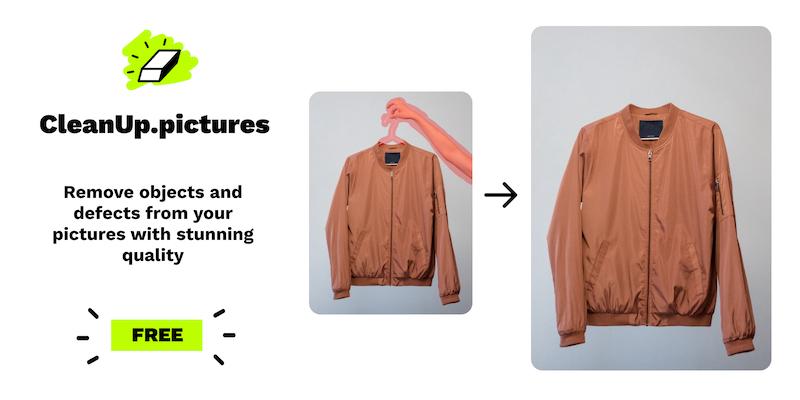
Cleanup.pictures is an AI-powered web application that removes unwanted objects, people, text, and defects from photos using advanced inpainting technology. It offers a quick and simple interface for retouching images in seconds. Target users include photographers, creative agencies, real estate agents, and e-commerce professionals who need to enhance images. An API is available for developers to integrate high-quality inpainting into their products.

Design & Creative
Visit website
Added on
Sep 30, 2026
Monthly Visits
1.3M
AI InpaintingObject RemovalText RemovalHigh-Res EditingWeb AppAPI Available
Product information

Everything worth knowing about Cleanup.pictures

The complete picture — from everyday features to the technical detail builders and IT folks dig for.

Core features

What it actually does

Object Removal
Remove unwanted objects, defects, or people from photos using AI inpainting.
Text and Watermark Removal
Erase text, logos, date stamps, or watermarks with impressive accuracy.
High-Resolution Support
Import and edit images of any size; unlimited export resolution for Pro version.
Drag and Drop Interface
Simple web interface to drag and drop images for quick editing.
Cross-Platform Access
Subscription works on both mobile and desktop devices.
Technical capabilities
AI Inpainting Technology
Uses artificial intelligence to reconstruct areas behind unwanted elements, unlike traditional clone tools.
Must watch videos
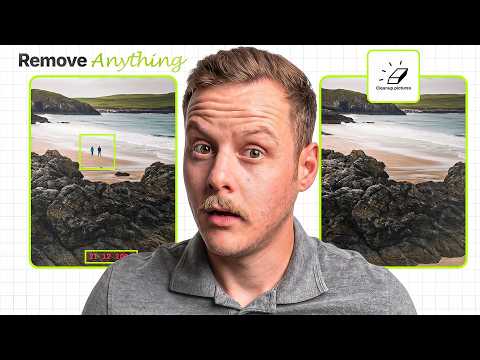
Cleanup.pictures Tutorial 2026 | This AI Removes Objects from Photos Better Than You'd Expect
4:38
Comparison4:38
Cleanup.pictures Tutorial 2026 | This AI Removes Objects from Photos Better Than You'd Expect
🔗 Try Cleanup.pictures here: https://cleanup.pictures/ Cleanup.pictures is an AI-powered photo editing tool that removes unwanted objects, people, text, wires, blemishes, and distractions from images in seconds. In this tutorial, I explore AI object removal, brush editing, image retouching, API integration, and professional photo cleanup workflows. ⏱️ Timestamps 00:00 Why Cleanup.pictures Is So Useful 00:33 AI Object Removal Overview 00:55 Real-World Editing Use Cases 01:34 Brush-Based Editing Workflow 01:56 Zoom & Precision Tools 02:13 AI Background Reconstruction 02:34 Business & Professional Use Cases 02:58 API Integration for Developers 03:16 Pricing Plans Explained 03:42 Why Cleanup.pictures Stands Out 04:13 Final Verdict 📩 Business & Sponsorship Inquiries: contact@locoai.co #CleanupPictures #PhotoEditing #AIPhotoEditor #ImageEditing #AITools 📩 Business Inquiries: contact@aioutlet.us 🌐 Discover more AI tools and resources at AI Outlet. © AI Outlet. All rights reserved.
iFoto Ai :Cleanup Pictures in Seconds.
1:40
Tutorial1:40
iFoto Ai :Cleanup Pictures in Seconds.
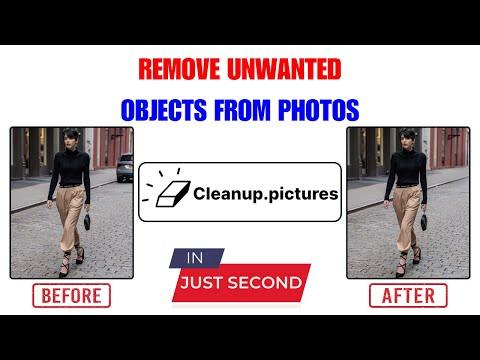
No photo editing skills required. Easily remove unwanted objects, people, or text to make your pictures perfect in no time with AI technology.
Remove Objects in Seconds with Cleanup.pictures
1:25
Tutorial1:25
Remove Objects in Seconds with Cleanup.pictures
In this AI Demo, uncover the swift and simple capabilities of Cleanup.pictures 🟥 How It Works : - ➡️ Upload : - Add any image that needs editing. ➡️ Select : - Use the brush tool to mark unwanted objects. ➡️ Remove : - Watch as the distractions disappear instantly. ➡️ Compare : - Check the before and after with a single click. ➡️ Download : - Happy with the result? Download your flawless photo. Transform your photos into flawless memories with Cleanup.pictures! Try 👉 : - https://cleanup.pictures/?via=aidemos For more AI Demos like this one, check out https://www.aidemos.com. 💻 AIDemos.com is your go-to directory for 🎥 video demos of the latest 🤖 AI tools, technologies, and 💰 SaaS solutions. Our goal is to educate and inform anyone interested in AI about the 🚀 potential of what's possible with AI. Explore our directory of AI demos and discover the 🔥 power of AI. ► WATCH NEXT : - 1. Create Stunning Visuals in Seconds with ClipDrop AI-Powered Platform | ClipDrop Demo - https://youtu.be/VEqpkPE2fck 2. Easily Remove Unwanted Objects from Your Photos with ObjectRemover | ObjectRemover Demo - https://youtu.be/1bNrrwFLsP4 3. Erase People or Objects from an Image with Hama | Hama Demo - https://youtu.be/pjJH0gd__jk Your Queries : - Cleanup.pictures, cleanup.pictures, cleanup pictures, Cleanup pictures, Object Remover, Erase Unwanted Objects in Our Photo Using Cleanup.pictures, Erase Unwanted Objects in Our Photo, AI Unwanted Objects Remover Tool, AI Unwanted Objects Remover, Unwanted Objects Remover, Objects Remover, Remove Unwanted Part In Our Photo Using AI, Remove Unwanted Part In Our Photo, Remove Unwanted Object From Photo, How Remove Unwanted Objects from Photo? Remove Unwanted parts from Photo, Remove Unwanted Thing From Photo, 📲 Follow Us on Social Media : - ▶️ Subscribe : - https://www.youtube.com/@aidemos.futuresmart ▶️ Twitter : - https://twitter.com/aidemos_video ▶️ Instagram : - https://www.instagram.com/futuresmart.ai/?hl=en ▶️ Subscribe : -https://www.youtube.com/@FutureSmartAI ▶️ LinkedIn : -https://www.linkedin.com/showcase/90879094/admin/feed/posts/ https://www.linkedin.com/in/pradipnichite/ #AIDemos #CleanupPictures #PhotoEditingSimplified #PerfectPhotosEveryTime #viral #viralvideo

Who uses it

Real use cases, no hype
Photography Cleanup
Remove tourists, timestamps, or blemishes from photos.
Creative Design
Quickly remix images by removing unwanted elements.
Real Estate Enhancement
Clean up property photos by removing personal items or defects.
E-commerce Product Shots
Create clean product images by removing background clutter.
Watermark and Text Removal
Eliminate logos, dates, or watermarks from images.
Developer API Integration
Use inpainting API in applications for automated image editing.
What's great
  • AI-powered inpainting for seamless object removal
  • Simple drag-and-drop interface
  • Free tier for basic usage
  • High-quality results compared to clone tools
Technical strengths
  • API available for developer integration
Where it falls short
  • Free version limited to 720p export resolution
  • Pro subscription required for high-res images
  • Subscription can be costly for occasional users
Technical limitations
  • Specialized tool, no advanced editing features
  • API usage has separate pricing
For technical folks

The deep-dive specs

Core Technology
Artificial Intelligence-based inpainting
API Compatibility
Node.js, SwiftUI, Kotlin, and other environments

FAQ

Includes technical Q&A
Inpainting is a retouch technology using AI to remove unwanted objects from photos.

Traffic Insights

Monthly Visits

1.3M

November 2026

Growth Rate

0%

vs last month

Dominance

0%

in Design & Creative

Top Country

United States

16% of traffic

Top Countries Breakdown

United States
16%
India
15%
Bangladesh
11%
United Kingdom
4%
Brazil
3%

Growth Trend

Stable

Traffic has remained stable.

Honest pricing

No sneaky tiers, no “contact sales”

Here's who each plan is actually for — and where the hidden charges might hit.

Free
Free

Individuals

  • ['Unlimited images'
  • 'Resolution limited to 720p']
Pro
Most picked
$5/mo

Individuals

  • ['Unlimited images'
  • 'Unlimited resolution'
  • 'High quality refiner']
ClipDrop Pro
$11/mo

Teams

  • ['Cleanup'
  • 'Remove background'
  • 'Replace background'
  • 'Uncrop'
  • 'Generative fill'
  • 'A lot of other tools']
View Full Plans & Pricing on Cleanup.pictures

Official pricing, checkout, and plan upgrades are handled directly on cleanup.pictures.

Reviews

What the internet actually thinks

Data refreshed weekly. No paid placements.

Trustpilot
Not reviewed yet
G2
G2
Not reviewed yet
C
Capterra
Not reviewed yet
Product Hunt
Not reviewed yet
COMMUNITY COMMENTS

Leave a Comment

Help others make informed decisions. Your honest feedback shapes the community's understanding of this tool.

Tips for commenting

  • •Be specific about features you used
  • •Share real use cases and results
  • •Mention both pros and cons
  • •Keep it honest and constructive
to leave a comment

Your comment is published immediately.

Filter:
Sort:

No comments yet

Be the first to share your experience with this tool.

Alternatives

Not quite the right fit?

Here's what else is out there.