Plus AI

Plus AI

Plus AI is an AI-powered presentation builder and editor that integrates directly into Google Slides and Microsoft PowerPoint. It allows users to generate entire slide decks from a prompt, upload documents (PDF, Word, text) for conversion into presentations, and refine existing slides using AI for reformatting, rewriting, and adding visual elements like images, icons, and charts. The tool is designed for professionals who need to create polished, results-oriented presentations efficiently within their existing workflow. It offers custom branding, template libraries, and enterprise-level features like SSO and white-glove onboarding. Key capabilities include a 'Remix' feature to reformat slides, multi-language support, and an API for programmatic presentation creation.

Design & Creative
Visit website
Added on
Sep 21, 2026
AI Slide GeneratorPowerPoint Add-inGoogle Slides Add-onDocument to PresentationAI Image GenerationCustom TemplatesEnterprise Security
Product information

Everything worth knowing about Plus AI

The complete picture — from everyday features to the technical detail builders and IT folks dig for.

Core features

What it actually does

AI Presentation Generation
Create entire presentations from a text prompt or generate individual slides with specific formats for more control.
Document to Presentation
Convert PDFs, Word docs (.docx), text files, or other formats directly into a PowerPoint or Google Slides presentation.
AI Editing and Refinement
Rewrite, elaborate, summarize, or improve phrasing and tone on existing slides. Use the 'Remix' feature to reformat any text into a new layout.
Custom Branding and Templates
Import and use your organization's custom slide templates, logos, colors, and fonts. Save shared presets and custom AI instructions for team-wide consistency.
AI Image Generation
Generate custom images using style presets or custom prompts directly within your presentation.
Technical capabilities
Native Platform Integration
Works as a native add-on inside PowerPoint and Google Slides, generating native PPTX files using a custom Open XML renderer.
API and Automation
Offers a Presentations API, a Presentation Agent API, an MCP Server, and integration with Zapier for programmatic and automated slide creation.
Must watch videos
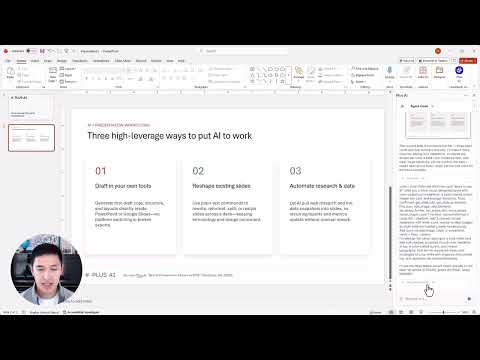
Plus AI Tutorial | How to use Plus AI in PowerPoint
10:33
Tutorial10:33
Plus AI Tutorial | How to use Plus AI in PowerPoint
Learn how to use Plus AI for PowerPoint to create and edit presentations. In this tutorial, we walk through installing the Plus AI add-in, generating a complete deck from a prompt, editing and remixing individual slides, and using AI to rewrite and polish your content - all without leaving PowerPoint. What we cover: 0:00 Intro 0:08 Installing the Plus AI add-in for PowerPoint 0:30 Creating a slide with the Plus AI presentation agent 2:47 Reformatting slides with the Plus AI agent 4:30 Rewriting slide content with the Plus AI agent 6:23 Inserting a single slide with Plus AI 7:55 Remix a drawing into a slide with Plus AI 9:39 Generate AI images and insert icons with Plus AI 🔗 Try Plus AI free for 7 days: https://plusai.com 📚 More tutorials and templates: https://plusai.com/blog Plus AI is the best AI presentation maker for PowerPoint and Google Slides. #PlusAI #PowerPoint #AIPresentation
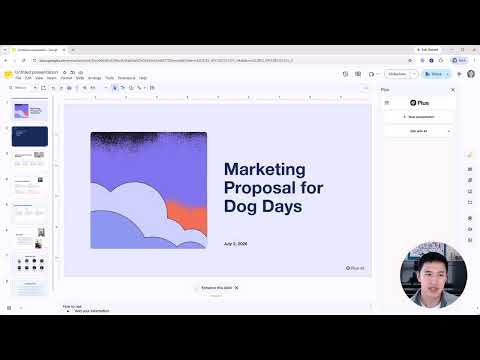
Plus AI Tutorial | How to use Plus AI in Google Slides
9:04
Tutorial9:04
Plus AI Tutorial | How to use Plus AI in Google Slides
Learn how to use Plus AI in Google Slides to create professional presentations. In this tutorial, we walk through installing the Plus AI add-on, generating a new presentation from a prompt, editing and remixing individual slides, and AI images and icons - all without having to leave Google Slides. What we cover: 0:00 Intro 0:13 Installing the Plus AI add-on 1:35 Generating a presentation from a prompt 5:05 Editing slides with AI (remix, rewrite, insert) 8:15 AI image generator and AI icons 🔗 Try Plus AI free for 7 days: https://plusai.com 📚 More tutorials and templates: https://plusai.com/blog Plus AI is the best AI presentation maker for Google Slides and PowerPoint. #PlusAI #GoogleSlides #AIPresentation
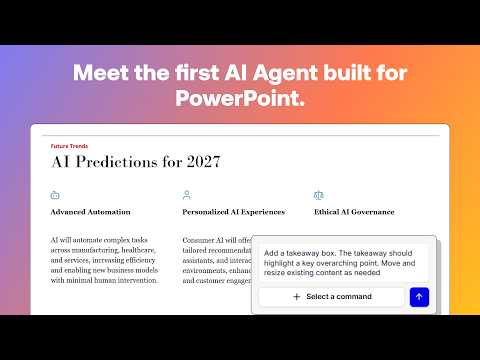
The Best AI Agent for PowerPoint? See the Plus AI Presentation Agent in action
1:40
Tutorial1:40
The Best AI Agent for PowerPoint? See the Plus AI Presentation Agent in action
The Plus AI Presentation Agent is the most advanced AI agent built specifically for PowerPoint. It works natively inside PowerPoint and understands your presentation templates, brand styles, and slide layouts, so the content it generates doesn’t just sound good, it looks right. Every slide is created to match your existing formatting and slide designs automatically. The Plus AI Presentation Agent takes a big step beyond simple AI slide generation. Ask it to research a topic, structure your storyline, organize rough notes into a clear outline, and build beautifully designed slides from scratch. Once you have a draft, you can also ask Plus AI to deword your slide, suggest alternative layouts, or add additional elements like a takeaway box. All of these agentic workflows happen directly inside the tool you already use. There’s no exporting, no broken formatting, and no switching between apps. In this demo video, we walk through several common use cases and show how the Plus AI Presentation Agent can help you move from idea to polished deck faster than ever.

Who uses it

Real use cases, no hype
Client Pitch Decks
Generate polished sales or agency proposals directly in your workflow.
Strategy & Market Analysis
Turn research docs and data into clear, visual presentations.
Training & Course Creation
Convert lecture notes or articles into structured slide decks.
Team Reporting & Updates
Standardize and speed up weekly/monthly report creation with shared presets.
Brainstorming & Ideation
Rapidly prototype presentation structures from a simple prompt.
Reformatting Legacy Decks
Modernize old presentations using the Remix feature.
Multilingual Presentations
Create and translate slides in nearly any language.
What's great
  • Seamless integration inside PowerPoint and Google Slides
  • Creates native, fully-compatible PPTX and Google Slides files
  • Powerful 'Remix' feature reformat any slide instantly
  • Professional, designer-made templates included
  • Custom branding support for enterprise teams
Technical strengths
  • Uses own Open XML renderer for true PPTX fidelity
  • Offers Presentation Agent API and MCP Server for automation
  • SOC 2 Type II compliance with data encryption
Where it falls short
  • Paid plans required after 7-day trial
  • AI credit system can be limiting for heavy use
  • Free trial requires credit card upfront
  • Premium features like custom templates locked to Enterprise
Technical limitations
  • Credit cost varies by task complexity, can be unpredictable
  • No unlimited credits on non-Max plans
For technical folks

The deep-dive specs

FAQ

Includes technical Q&A
It creates native PPTX files (using a custom renderer) and Google Slides files, working directly inside your existing apps for full compatibility with your templates and workflows.

Traffic Insights

Monthly Visits

—

October 2026

Growth Rate

0%

vs last month

Dominance

0%

in Design & Creative

Top Country

—

Top Countries Breakdown

—

Growth Trend

Stable

Traffic has remained stable.

Honest pricing

No sneaky tiers, no “contact sales”

Here's who each plan is actually for — and where the hidden charges might hit.

Basic
$15/mo

Individuals

  • 1500 AI credits per month
  • Create AI presentations in Google Slides and PowerPoint
  • Insert single slides
  • Rewrite and remix slides with AI
Pro
Most picked
$25/mo

Individuals and Teams

  • Everything in Basic
  • 3000 AI credits per month
  • Document uploads (PDF
  • docx
  • txt)
  • 100K+ character prompts
Team
$40/mo

Teams

  • Everything in Pro
  • 6000 AI credits per month
  • Customize branding (logo
  • colors
  • and fonts)
  • Use advanced AI image models
Max
$240/mo

Power Users and Teams

  • Everything in Team
  • Unlimited AI credits
  • Priority email support
  • Unlimited team members
  • Team-wide custom branding and templates
  • Shared preset library
Enterprise
Custom

Enterprise

  • Advanced templates
  • Asset libraries
  • Custom slide libraries and assets
  • SSO and user management
  • White-glove onboarding
  • Enterprise-grade security and compliance
View Full Plans & Pricing on Plus AI

Official pricing, checkout, and plan upgrades are handled directly on plusai.com.

Reviews

What the internet actually thinks

Data refreshed weekly. No paid placements.

Trustpilot
Not reviewed yet
G2
G2
Not reviewed yet
C
Capterra
Not reviewed yet
Product Hunt
Not reviewed yet
COMMUNITY COMMENTS

Leave a Comment

Help others make informed decisions. Your honest feedback shapes the community's understanding of this tool.

Tips for commenting

  • •Be specific about features you used
  • •Share real use cases and results
  • •Mention both pros and cons
  • •Keep it honest and constructive
to leave a comment

Your comment is published immediately.

Filter:
Sort:

No comments yet

Be the first to share your experience with this tool.

Alternatives

Not quite the right fit?

Here's what else is out there.