Pendo

Pendo

Pendo is a comprehensive product experience platform designed to help teams understand user behavior, improve digital adoption, and enhance product-led growth. It combines product analytics, in-app guidance, session replay, and sentiment surveys to provide a full view of the user journey. The platform is used for user onboarding, feature adoption, and optimizing both human and AI agent interactions within software products. Core capabilities include event tracking, funnel and path analysis, NPS/CSAT surveys, and a visual editor for creating in-app guides without code. Pendo's 'Leo' AI agent allows users to query product data in natural language, and the 'Novus' AI agent auto-instruments codebases. It also offers Agent Analytics to monitor AI agent performance and 'Predict' for churn modeling. The platform integrates with popular tools like Salesforce, Slack, and Segment, and provides APIs for developers.

Analytics
Visit website
Added on
Sep 22, 2026
Monthly Visits
728.7K
Product AnalyticsIn-app GuidesSession ReplayAI Agent AnalyticsHeadless PendoMCP ServerPredictive AISOC2/GDPR/HIPAA
Product information

Everything worth knowing about Pendo

The complete picture — from everyday features to the technical detail builders and IT folks dig for.

Core features

What it actually does

Product Analytics
Track and analyze user behavior across your product to understand adoption, usage patterns, and drop-off points.
In-app Guides
Create and deploy user onboarding flows, tooltips, and announcements without engineering support.
Session Replay
Watch recordings of user sessions to see exactly how users interact with your product and identify friction.
Sentiment & Feedback Surveys
Collect user feedback via NPS, PMF, and CSAT surveys to measure satisfaction and gather qualitative insights.
Agent Analytics
Monitor AI agent adoption, usage, and failure points to measure ROI and optimize performance.
Technical capabilities
Headless Pendo & MCP Server
Feed product context to AI agents and tools via Model Context Protocol, enabling natural language querying and automated actions.
Predictive AI (Predict)
Use pre-built models to forecast churn and identify upsell opportunities, connecting Pendo data with CRM/BI tools.
Must watch videos
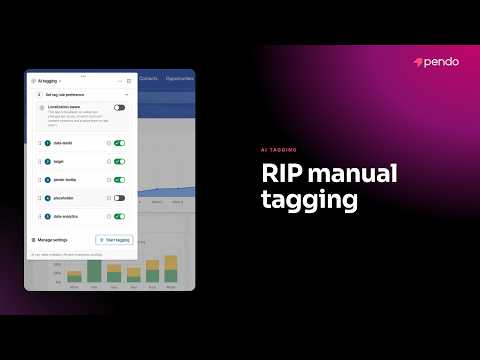
Meet AI Tagging — The End of Manual Product Tagging in Pendo
6:37
Tutorial6:37
Meet AI Tagging — The End of Manual Product Tagging in Pendo
Tagging a product used to mean weeks of manually defining every page and feature before you could get real analytics out of it. Meet AI tagging— now in open beta for all Pendo customers. Here's a full look at how it works inside Pendo's designer: ✅ AI tagging opens by default and scans your app automatically ✅ Set a naming convention so suggested tags match your team's standards ✅ Choose which tagging rules the AI should use, and reorder your preferences ✅ Use multi-page capture to tag multi-step flows like setup wizards and modals ✅ Give the AI extra context about your product before it starts tagging ✅ Review suggestions with confidence scores, and jump straight to the element on screen ✅ Accept, edit, or hide tags — nothing is applied until you approve it Manual tagging has long been the price of admission for real product analytics. Read the full story of how AI tagging came together, including what happened when one Customer Engineer turned it on live with a customer 👉 https://www.pendo.io/pendo-blog/meet-ai-tagging/ — 0:00 – What AI tagging is & where to find it 0:23 – Set your naming convention & tag rules 1:11 – Manage settings: multi-page capture & context 2:07 – How AI tagging scans and suggests tags 3:44 – Reviewing suggestions: creates, updates & confidence scores 5:12 – Accept, edit, or hide suggested tags #AITagging #ProductAnalytics #ProductManagement
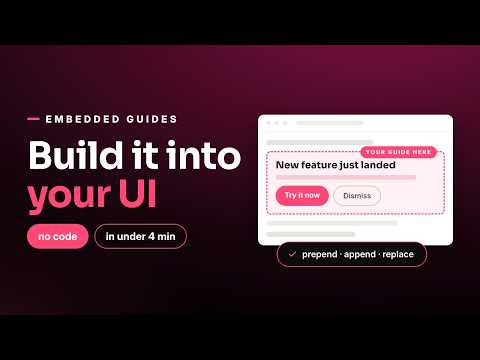
Pendo In-app Guides: How to Build an Embedded Guide (No Code, No Dev Team)
3:42
Tutorial3:42
Pendo In-app Guides: How to Build an Embedded Guide (No Code, No Dev Team)
Need to announce a new feature, flag a bug, or warn users about a workaround—without a pop-up interrupting them or a dev ticket to change your UI? Embedded guides become part of your interface, so users can't even tell they're looking at a guide. In under 4 minutes, you'll see: ✅ The difference between overlay (pop-up) guides and embedded guides ✅ How to create an embedded guide from an existing layout—or with AI ✅ Why warnings and feature announcements are the perfect embedded guide use case ✅ How to place your guide with prepend, append, or replace targeting ✅ How to add titles, body copy, and buttons that trigger multi-step guides ✅ What the finished guide looks like live—seamlessly blended into the UI ✅ How users closing the guide restores the page instantly, no dev work needed ✅ Going further with custom HTML to match your brand exactly When users miss key features or hit friction, in-app messaging that feels native to your product drives adoption without disrupting the experience. Pendo In-app Guides let you modify your UI, personalize every message, and measure what works—all without engineering. 👉 Learn more: https://www.pendo.io/product/in-app-guides/ — Chapters: 0:00 – Embedded guides vs. pop-up guides 0:19 – Creating a new embedded guide 0:46 – Best use case: warnings & announcements 1:21 – Launching the designer & choosing placement 1:52 – Prepend, append, or replace your UI 2:24 – Adding content and multi-step buttons 3:04 – The finished guide, live in the product #InAppGuides #DigitalAdoption #UserOnboarding
How a PM Builds with AI: Inside Pendo's Zero-to-One Product, Novus | Builder Series
3:03
Tutorial3:03
How a PM Builds with AI: Inside Pendo's Zero-to-One Product, Novus | Builder Series
Tiffany Kitchen, Lead Product Manager at Pendo, shares how working on the AI-native product Novus has transformed her role, from prototyping with code and using data-driven ideation to building customer empathy by getting hands-on in the terminal. Learn how Novus acts as an always-on product agent that monitors user experience, diagnoses issues, and even ships fixes automatically. Check it out: novus.ai

Who uses it

Real use cases, no hype
User Onboarding
Create and manage in-app guides to coach new users through core features without engineering help.
Product Analytics
Track user behavior, feature adoption, and retention metrics across web and mobile apps.
AI Agent Monitoring
Measure adoption, usage, and failure points of AI agents to prove ROI and improve performance.
Friction Detection
Use Session Replay and analytics to watch real user sessions and identify rage clicks or failure points.
Churn Prevention
Deploy Predictive AI models to identify at-risk accounts and trigger proactive retention campaigns.
Product-Led Growth
Launch in-app NPS surveys, feedback widgets, and targeted announcements to drive expansion.
Developer Integration
Feed product context to external AI agents and tools via the MCP server or Engage API.
What's great
  • All-in-one platform for analytics, in-app guides, and session replay
  • Powerful AI features (Leo, Predict, Agent Analytics) for proactive insights
  • No-code in-app guide builder empowers non-technical teams
  • Comprehensive user journey mapping from first use to ongoing behavior
Technical strengths
  • MCP server for seamless integration with AI tools and agents
  • Handles 6B+ events daily at scale with retroactive analytics
  • Built-in compliance (SOC2, GDPR, HIPAA) reduces security overhead
Where it falls short
  • Custom pricing model lacks transparency and requires sales contact
  • Can be expensive for high-MAU applications or startups
  • Initial setup and agent tagging can be complex and time-consuming
  • Session Replay only available on higher-tier (Core+) plans
Technical limitations
  • Advanced data analysis may still require export to external BI tools
  • Predict and Agent Analytics are paid add-ons, not included in base
  • Mobile agent support may lag behind web in feature parity
For technical folks

The deep-dive specs

FAQ

Includes technical Q&A
The Model Context Protocol (MCP) server allows AI tools like Claude or custom agents to query your Pendo data in natural language, enabling them to pull insights and perform actions directly within your product context.

Traffic Insights

Monthly Visits

728.7K

November 2026

Growth Rate

0%

vs last month

Dominance

0%

in Analytics

Top Country

United States

75% of traffic

Top Countries Breakdown

United States
75%
United Kingdom
10%
Bangladesh
2%
Canada
2%
India
1%

Growth Trend

Stable

Traffic has remained stable.

Honest pricing

No sneaky tiers, no “contact sales”

Here's who each plan is actually for — and where the hidden charges might hit.

Base
Custom pricing

Teams

  • Product Analytics
  • In-app Guides
  • Custom MAU volume
Core
Custom pricing

Teams

  • Product Analytics
  • In-app Guides
  • Session Replay
  • Custom MAU volume
Ultimate
Most picked
Custom pricing

Enterprises

  • Product Analytics
  • In-app Guides
  • Session Replay
  • Sentiment (NPS
  • PMF
  • CSAT surveys)
  • Orchestrate
View Full Plans & Pricing on Pendo

Official pricing, checkout, and plan upgrades are handled directly on pendo.io.

Reviews

What the internet actually thinks

Data refreshed weekly. No paid placements.

Trustpilot
Not reviewed yet
G2
G2
Not reviewed yet
C
Capterra
Not reviewed yet
Product Hunt
Not reviewed yet
COMMUNITY COMMENTS

Leave a Comment

Help others make informed decisions. Your honest feedback shapes the community's understanding of this tool.

Tips for commenting

  • •Be specific about features you used
  • •Share real use cases and results
  • •Mention both pros and cons
  • •Keep it honest and constructive
to leave a comment

Your comment is published immediately.

Filter:
Sort:

No comments yet

Be the first to share your experience with this tool.

Alternatives

Not quite the right fit?

Here's what else is out there.