FlutterFlow

FlutterFlow

FlutterFlow is a visual, low-code development environment for building cross-platform applications using the Flutter framework. It allows users to design UIs with a drag-and-drop builder, create app logic through a visual action flow editor, and integrate with backend services like Firebase and Supabase. The platform is designed for developers, founders, and product teams to rapidly prototype and deploy production-ready apps to iOS, Android, Web, and Desktop. Key capabilities include a library of pre-built UI components, real-time collaboration features, code export for full customization, and one-click deployment to app stores. It bridges the gap between design and development, enabling faster iteration and reducing reliance on specialized coding resources for many app types.

Web Design
Visit website
Added on
Sep 21, 2026
Visual App BuilderFlutter Code ExportFirebase/SupabaseTeam CollaborationMulti-Platform DeployCustom Code
Product information

Everything worth knowing about FlutterFlow

The complete picture — from everyday features to the technical detail builders and IT folks dig for.

Core features

What it actually does

Visual UI & Logic Builder
Build and design your app's interface and business logic using a drag-and-drop visual editor with 200+ pre-designed elements and a visual action flow editor.
Cross-Platform Deployment
Build once and deploy to iOS, Android, and Web from a single codebase. Publish to app stores or the web with a few clicks.
Real-Time Collaboration
Work with your team using branching, comments, and task assignments directly within the platform.
Firebase & Supabase Integration
Quickly connect your app to backend databases and services using built-in integrations for Firebase and Supabase.
Technical capabilities
Custom Code & Extensibility
Write custom Dart code, build custom widgets and actions, and extend the platform's capabilities beyond visual building.
Code Export & Ownership
Export your full Flutter codebase with a single click. No vendor lock-in; you own the code.
Must watch videos
FlutterFlow AI Build (Full Workflow)
12:34
Tutorial12:34
FlutterFlow AI Build (Full Workflow)
Build a complete, branded app in under 15 minutes using FlutterFlow, FlutterFlow Designer, and AI‑powered instant generation—no code required. Watch the step‑by‑step workflow from idea to a fully structured five‑page app, all for free. 00:00 Intro – Build a full app from a logo in under 15 minutes using no‑code and AI 00:26 Tools Overview – Meet the free platforms Flutter Flow and Flutter Flow Designer 01:05 Getting Started – Upload your logo and launch AI generation instantly 01:37 Instant Generation – Prompt the AI to create a to‑do list app for entrepreneurs 02:26 Adding a Style Guide – Attach your logo and color palette to guide the design 03:13 AI Builds Branding – See the AI generate pages, colors, and even a brand name 03:48 Design Preview – Explore the auto‑created pages, components, and widget tree 04:48 Sharing & Export – Share the design or export it directly into Flutter Flow 05:32 Branding Accuracy – Watch how the AI captures brand language and adds animations 06:12 Import into Flutter Flow – Start a new project and paste the generated frames 07:16 Front‑End Focus – This video covers the UI side; backend is covered elsewhere 08:31 Copy‑Paste Workflow – Copy frames from Designer and paste them into Flutter Flow 09:41 Result Review – Review the five imported pages ready for backend connections 10:10 Speed & Cost Benefits – Build a complete app for free in under 15 minutes - Generate a to‑do list app (or any idea) instantly with AI, using just a description or a style guide. - Upload your logo and color palette and let the tool create matching UI components and themes. - Export the generated design frames from FlutterFlow Designer directly into a FlutterFlow project with a single copy‑paste. - Apply the designer’s theme to automatically style all pages and widgets in your new app. - Move from visual design to connecting the backend in under 15 minutes, demonstrating the fast, no‑code workflow. AI Training and Playbooks for your business and team. Join NOW- https://www.launchlabshq.com/ My Favorite Automation and AI Tools Lovable Building Your Dream App with AI- https://lovable.dev/?via=doc VidSell Build your video business- https://swiy.co/lNLa Start with Descript – Trim filler words, add subtitles/animations instantly- https://get.descript.com/g1b5gmi1hmtg Notebook LM: Link your source docs, generate accurate, rail-bound outputs- https://notebooklm.google.com/ Try Transcript LOL – Paste any video/audio transcript and instantly spin out blogs, socials, and more- https://transcript.lol?ref=9MFLRwmpXDlz Short-form clips → Opus Clip- https://www.opus.pro/?via=docwilliams Auto-re-posting → Repurpose.io- https://repurpose.io/?aff=2102 Newsletters → Kawara- https://www.kawara.ai/ YouTube planning → Subscribr- https://subscribr.ai/?via=doc Social Proof with AI https://senja.io/?via=doc62 AI Recording and SOPs https://www.komododecks.com/?via=doc Affiliate links included
Text-to-App Page with AI | Page Gen | FlutterFlow AI Gen Release (1/4)
1:12
Tutorial1:12
Text-to-App Page with AI | Page Gen | FlutterFlow AI Gen Release (1/4)
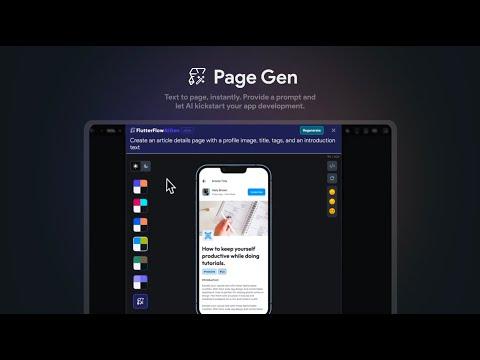
Provide a prompt and let AI kickstart your app development. Quickly customize the result, add it to your project or export the generated Flutter code. Page Gen is part of a suite of AI tools recently launched by FlutterFlow. To start building with AI, check out all the ways you revolutionize your app building experience with FlutterFlow (https://flutterflow.io/ai-gen) Ready to try FlutterFlow for yourself? Start building your app today with a free trial 👉 https://www.flutterflow.com Follow us on Twitter 👉 https://twitter.com/flutterflow -------------- FlutterFlow is a low-code builder for native apps, bringing design and development into one tool. With drag-and-drop functionality, you can build pixel-perfect UIs and easily connect your app to live data via Firebase or APIs. Plus, you can add advanced features like push notifications, payments, animations, and more. Whether you build your own custom widgets or write custom code, FlutterFlow makes it easy to bring your app ideas to life.
FlutterFlow's Native AI Agents: Build Apps with Claude Code & Codex
2:37
Tutorial2:37
FlutterFlow's Native AI Agents: Build Apps with Claude Code & Codex
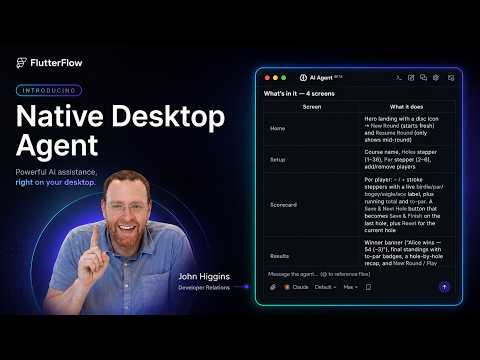
FlutterFlow now has native AI agents built right into the macOS desktop app, so you can use Claude Code and Codex without ever leaving your project. In this video, I'll show you how to connect your agents, send your first prompt, and let AI build out a full app UI for you (I'm building a frisbee golf scoring app as the demo). You'll see how the agent generates pages, writes custom code for score calculations, and how you can feed FlutterFlow widgets directly into the agent's context for design variations. I'll also cover remote access on mobile, resuming sessions in the terminal, and managing your conversation threads. Download MacOS Desktop App: https://flutterflow.io/desktop What's covered: - Connecting Claude Code & Codex inside FlutterFlow - Overriding settings and downloading logs if setup fails - Choosing your model and reasoning level - Building a full app UI from a single prompt - Adding widgets to the agent's context for new design variations - Continuing sessions on mobile (Claude/Codex apps) or in the terminal - Managing threads and reviewing past conversations Got questions? Drop them in the comments and I'll see you in the next one! Timestamps: 0:00 Accessing the AI agent in FlutterFlow 0:25 Settings, overrides & downloading logs 0:33 Sending your first message 0:47 Building the app UI with Opus 1:01 Reviewing the generated pages & custom code 1:32 Adding widgets to context for design variations 1:56 Remote access on mobile (Claude/Codex apps) 2:17 Resuming in the terminal 2:24 Threads & conversation history Ready to try FlutterFlow for yourself? Start building your app today with a free trial 👉 https://www.flutterflow.com Follow us on Twitter 👉 https://twitter.com/flutterflow -------------- FlutterFlow is a visual development platform for building native apps, bringing design and development into one tool. With drag-and-drop functionality, you can build pixel-perfect UIs and easily connect your app to live data via Firebase or APIs. Plus, you can add advanced features like push notifications, payments, animations, and more. Whether you build your own custom widgets or write custom code, FlutterFlow makes it easy to bring your app ideas to life.

Who uses it

Real use cases, no hype
Rapid MVP Building
Launch a functional minimum viable product in days, not months, to validate ideas quickly.
Internal Business Tools
Create custom dashboards, data entry apps, or admin panels for your team without hiring dedicated developers.
Client Prototyping
Quickly build interactive app prototypes to present to clients or stakeholders for feedback.
Cross-Platform Apps
Develop once and deploy a single codebase to iOS, Android, Web, and Desktop from a single project.
No-Code/Low-Code Empowerment
Enable product managers or designers to build and iterate on app logic and UI without deep coding knowledge.
Startup Funding Demos
Create a polished, working demo to showcase to investors during seed or funding rounds.
Legacy System Frontend
Build a modern, responsive frontend for an existing backend system or API using visual tools.
What's great
  • Extremely fast app prototyping and MVP development.
  • Visual builder generates real, exportable Flutter/Dart code.
  • No vendor lock-in; you own and can download the code.
  • Seamless integration with Firebase and Supabase backends.
Technical strengths
  • Rich widget library and built-in UI components for rapid layout.
  • Action Flow Editor for visual logic without deep coding.
  • Supports multi-platform deployment (iOS, Android, Web, Desktop).
Where it falls short
  • Advanced logic can become complex in the visual editor.
  • Learning curve for users unfamiliar with Flutter concepts.
  • Free tier is severely limited for serious projects.
  • Collaboration features are locked to paid Growth/Business plans.
Technical limitations
  • Generated code can be verbose and harder to hand-optimize.
  • Dependency on Flutter ecosystem for native plugin support.
  • AI generation credits are limited and metered per plan.
For technical folks

The deep-dive specs

FAQ

Includes technical Q&A
No, FlutterFlow is designed for visual development. However, knowing Flutter concepts helps for advanced customization and debugging.

Traffic Insights

Monthly Visits

—

November 2026

Growth Rate

0%

vs last month

Dominance

0%

in Web Design

Top Country

—

Top Countries Breakdown

—

Growth Trend

Stable

Traffic has remained stable.

Honest pricing

No sneaky tiers, no “contact sales”

Here's who each plan is actually for — and where the hidden charges might hit.

Free
Free

Individuals

  • Visual Development Environment
  • 1000+ Prebuilt Templates
  • Build Mobile
  • Web
  • & Desktop Apps
  • API & Data Integration
Basic
Most picked
$23.4/mo

Individuals

  • Everything in Free
  • plus: Unlimited Projects
  • Code Download
  • APK Download
  • Custom Domain Web Publishing
  • Test On Local Devices
  • One-Click App Store Deployment
Growth
$481/mo

Teams

  • Everything in Basic
  • plus: GitHub Integration
  • Real-Time Collaboration (2 Users)
  • 2 Open Branches Per Project
  • One-Click Localization
  • Swagger/OpenAPI Imports
  • VS Code Extension
Business
$901/mo

Teams

  • Everything in Growth
  • plus: Collaboration Up To 5 Users
  • 5 Open Branches Per Project
  • Up To 3 Automated Tests
  • Figma Frame Import
  • Custom Typography
  • CLI Access
View Full Plans & Pricing on FlutterFlow

Official pricing, checkout, and plan upgrades are handled directly on flutterflow.io.

Reviews

What the internet actually thinks

Data refreshed weekly. No paid placements.

Trustpilot
Not reviewed yet
G2
G2
Not reviewed yet
C
Capterra
Not reviewed yet
Product Hunt
Not reviewed yet
COMMUNITY COMMENTS

Leave a Comment

Help others make informed decisions. Your honest feedback shapes the community's understanding of this tool.

Tips for commenting

  • •Be specific about features you used
  • •Share real use cases and results
  • •Mention both pros and cons
  • •Keep it honest and constructive
to leave a comment

Your comment is published immediately.

Filter:
Sort:

No comments yet

Be the first to share your experience with this tool.

Alternatives

Not quite the right fit?

Here's what else is out there.