Runcell

Runcell

Runcell is a Jupyter-native AI agent that turns a question into executed notebook work. It inspects your .ipynb, plans the analysis steps, writes Python, runs the cells, diagnoses errors, and reads back the tables, charts, and statistics your code produces — then continues from that evidence instead of guessing. Installed via pip, it lives in the JupyterLab sidebar (JupyterLab 4.4+, Python 3.10+) and works on existing notebooks. It keeps cross-session memory of your dataset and decisions, and bundles access to GPT, Claude, and Gemini models with no API key required. Built for data analysts, data scientists, and quant researchers who need reproducible, explainable results. Free Hobby tier with 20 monthly credits; paid plans from $20/mo up to $200/mo for heavy agent workloads.

Coding
Visit website
Added on
Nov 4, 2026
Jupyter-nativeExecutes PythonReads cell outputsNo API keyMulti-step agentCross-session memorypip installGPT/Claude/Gemini
Product information

Everything worth knowing about Runcell

The complete picture — from everyday features to the technical detail builders and IT folks dig for.

Core features

What it actually does

Notebook-native agent
Runs as a JupyterLab extension inside your existing .ipynb files — no new editor, no separate desktop app, no rewritten workflow.
Autonomous multi-step execution
Describe the result you need and it plans notebook steps, writes the Python, runs the cells, and recovers from errors without you babysitting each cell.
Output-aware reasoning
Reads tables, statistics, charts, and image outputs from executed cells so the next decision is based on what actually happened, not on guessing from code.
Cross-session memory
Keeps your dataset, decisions, and work state across sessions so you can reopen a multi-week project and ask 'what did we do so far?' instead of re-explaining everything.
Technical capabilities
Batteries-included model access
Ships with access to leading models (GPT, Claude, Gemini) based on your plan — no OpenAI or Anthropic API key required to start.
Token-based credit metering
Ask/Chat and Agent input/output tokens are converted into credits, with per-feature rules for Ask/Chat, Agent, completions, and image generation.
Environment requirements
Python 3.10+ and JupyterLab 4.4.0+ only — classic Jupyter Notebook is explicitly not supported. Installs via pip, conda+pip, uv, or a manual wheel.
Must watch videos
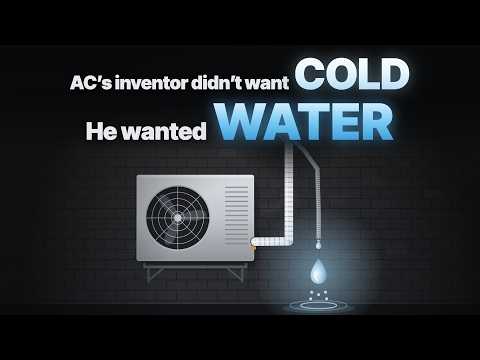
How Was Air Conditioning Invented? Its Inventor Wanted Water, Not Cold
12:30
Tutorial12:30
How Was Air Conditioning Invented? Its Inventor Wanted Water, Not Cold
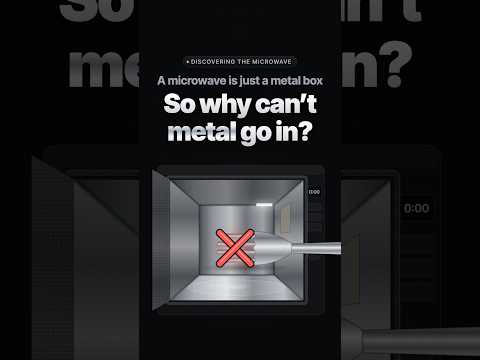
story behind microwave, what can be put in and what cannot
3:14
Tutorial3:14
story behind microwave, what can be put in and what cannot
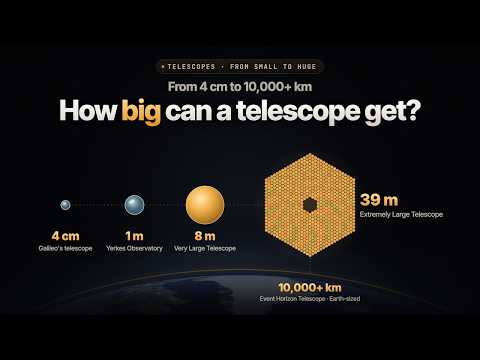
How Telescopes Grew From 4 cm to the Size of the Earth
3:24
Tutorial3:24
How Telescopes Grew From 4 cm to the Size of the Earth
The first image of a black hole was taken by a telescope the size of the Earth. But no mirror or dish on Earth is that big. So how was it done? This video starts with the simplest telescope and follows one idea all the way up. A magnifying glass makes small print bigger, but it turns the distant Moon into a blur. Add a concave lens in front of your eye and the Moon jumps closer: that is the telescope Galileo built in 1609. Then come the refracting telescope and Newton's reflecting telescope. What does a bigger mirror actually get you? Not magnification. That comes from the mirror's curve and the eyepiece. A bigger mirror collects more light, so you can see fainter, more distant things. A wider mirror also sees sharper, splitting stars that sit close together. Make it twice as wide and you collect four times the light and see details twice as fine. So for 400 years, astronomers have kept making mirrors bigger, and kept hitting limits: 4 cm: Galileo sees craters on the Moon and four moons circling Jupiter. 1 m: a lens can only be held by its edge, and any bigger it sags. 5 m: a mirror can be supported from behind. 8 m: a single piece of glass reaches its limit. 10 m and 39 m: mirrors built from 36 and 798 segments (the 39 m one is still under construction). 10,000+ km: eight radio telescopes around the world work as one Earth-sized telescope. Why can a mirror be built from pieces, or even spread apart? Cover part of a mirror and the image doesn't lose a corner. It only gets dimmer. With visible light, the pieces have to bring their light together in real time, so they stay within a few hundred meters of each other. Radio dishes can record the waves against atomic clocks and combine the recordings later, which is how the Event Horizon Telescope spans the planet. Chapters 0:00 A telescope the size of the Earth 0:10 One lens, then two: Galileo's telescope 0:34 Refractors and reflectors 0:50 What a bigger mirror really gets you 1:30 Making mirrors bigger: 1 m, 5 m, 8 m 1:58 The limit, and covering part of a mirror 2:19 Mirrors made of pieces 2:40 Why radio dishes can span the Earth 2:51 The Earth-sized telescope 3:05 The black hole image, and what comes next Notes The light-path diagrams, the covering experiment and the quasar starfield are illustrations. The Galilean-type telescope shown is a museum piece in Paris, not Galileo's own instrument. A fleet of mirrors in space that could show the continents of another Earth is a proposed concept, not a planned mission. Sources: Museo Galileo (catalogue records and Sidereus Nuncius); the Royal Society and the Science Museum Group (Newton's reflecting telescope); Yerkes Observatory; Caltech Palomar Observatory (the 200-inch Hale Telescope); W. M. Keck Observatory; European Southern Observatory (ELT, VLT and VLT Interferometer, eso9845d, eso1907); the CHARA Array; Event Horizon Telescope press release, 10 April 2019; Kardashev, Kovalev & Kellermann, "RadioAstron: An Earth-Space Radio Interferometer with a 350,000 km Baseline" (2012); Labeyrie, hypertelescope concept (ESA, 2003); OpenStax Astronomy and College Physics (light gathering and the Rayleigh criterion); NASA. Images: First image of a black hole: Event Horizon Telescope Collaboration (ESO eso1907a, CC BY 4.0) Galilean telescope: Rama, Musée des Arts et Métiers, Paris (Wikimedia Commons, CC BY-SA 3.0 FR) Galileo's drawings of the Moon: Galileo Galilei, 1610 (public domain) The Moon from Yerkes Observatory: Keystone View Company, before 1917, Museum of Photographic Arts (no known copyright restrictions) The Palomar 200-inch mirror: Los Angeles Daily News, UCLA Library (CC BY 4.0) NGC 1232: European Southern Observatory (eso9845d, CC BY 4.0) The four planets of HR 8799: Jason Wang (Caltech) / Christian Marois (NRC Herzberg), W. M. Keck Observatory (CC BY 4.0) Webb's First Deep Field: NASA, ESA, CSA, STScI (public domain) Earth: NASA Earth Observatory, Blue Marble (public domain) All other visuals are original.

Who uses it

Real use cases, no hype
Exploratory Data Analysis
Go from a business question to executable pandas code, with Runcell inspecting outputs and iterating.
Automated Cell Debugging
Hit an error mid-notebook? Runcell reads the traceback, patches the cell, and re-runs it in place.
Multi-Step Agent Workflows
Hand off long analysis chains — clean, transform, model, plot — and let the agent carry the thread.
Quant & Risk Analysis
Run portfolio, market, and forecast diagnostics inside notebooks you can defend later.
Learning New Methods
Explore analytical approaches side by side with real, runnable cell outputs as evidence.
Model Prototyping
Spin up baseline models, compare results, and keep every experiment reproducible in .ipynb.
Chart & Output Interpretation
Ask what a plot or summary table actually says — Runcell reasons from the rendered output.
What's great
  • Runs inside JupyterLab — no new IDE to learn
  • No API key needed; GPT, Claude, Gemini bundled
  • Actually reads charts, tables and cell outputs
  • Free Hobby tier with 20 monthly credits
Technical strengths
  • Executes and self-debugs cells in the live kernel
  • Cross-session memory of datasets and prior decisions
Where it falls short
  • JupyterLab 4.4+ only — classic Notebook unsupported
  • Credits evaporate fast on long agent runs
  • Requires Python 3.10+ and an account sign-in
Technical limitations
  • Token-based credit metering makes spend hard to predict
  • Closed source; inference routed through vendor cloud
  • No self-hosted or fully offline mode
For technical folks

The deep-dive specs

Current version
0.0.13
Python support
3.10+
JupyterLab support
4.4+ (Jupyter Notebook not supported)
Installation
pip (PyPI), conda + pip, uv, or manual wheel
License
Free to start
Extension UI
Right sidebar panel in JupyterLab
Vendor
Kanaries Data Inc.

FAQ

Includes technical Q&A
A Jupyter-native AI agent for data analysis, data science and research. It turns a question into executed notebook work — writing and debugging Python, running cells, reading outputs, and continuing from the result.

Traffic Insights

Monthly Visits

—

November 2026

Growth Rate

0%

vs last month

Dominance

0%

in Coding

Top Country

—

Top Countries Breakdown

—

Growth Trend

Stable

Traffic has remained stable.

Honest pricing

No sneaky tiers, no “contact sales”

Here's who each plan is actually for — and where the hidden charges might hit.

Hobby
Free

Individuals trying it out

  • ['20 credits per month'
  • 'Limited AI execution credits'
  • 'Limited access to LLM models']
Pro
Most picked
$20/mo

Heavy notebook users and teams

  • ['500 credits per month'
  • 'Access to all advanced models
  • like GPT 5.5
  • Claude Opus 4.7
  • Gemini 3.5 Pro'
  • 'Priority support'
  • 'Privacy mode']
Pro+
$60/mo

Heavy notebook and agent workflows

  • ['Everything in Pro'
  • '2
  • 000 credits per month'
  • '3x the Pro price
  • 4x the credits'
  • '25% lower cost per credit than Pro'
  • 'Access to all models'
Ultra
$200/mo

Intensive agent workflows

  • ['Everything in Pro+'
  • '10
  • 000 credits per month'
  • 'Access to all advanced models
  • like GPT 5.5
  • Claude Opus 4.7
  • Gemini 3.5 Pro'
Teams
$40 / seat

Teams

  • ['Everything in Pro'
  • '500 credits per seat per month'
  • 'Centralized billing for all seats'
  • 'Invite links for fast onboarding'
  • 'Team usage dashboard'
  • 'Admin controls and seat management']
View Full Plans & Pricing on Runcell

Official pricing, checkout, and plan upgrades are handled directly on runcell.dev.

Reviews

What the internet actually thinks

Data refreshed weekly. No paid placements.

Trustpilot
Not reviewed yet
G2
G2
Not reviewed yet
C
Capterra
Not reviewed yet
Product Hunt
Not reviewed yet
COMMUNITY COMMENTS

Leave a Comment

Help others make informed decisions. Your honest feedback shapes the community's understanding of this tool.

Tips for commenting

  • •Be specific about features you used
  • •Share real use cases and results
  • •Mention both pros and cons
  • •Keep it honest and constructive
to leave a comment

Your comment is published immediately.

Filter:
Sort:

No comments yet

Be the first to share your experience with this tool.

Alternatives

Not quite the right fit?

Here's what else is out there.