Pieces

Pieces

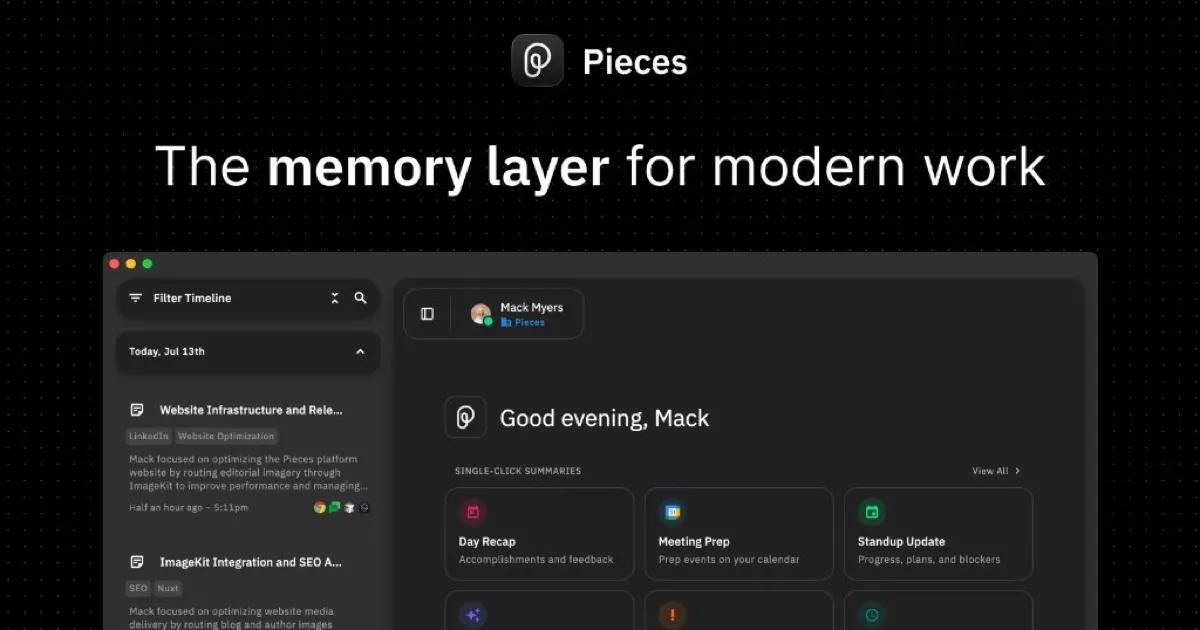
Pieces is a desktop application that acts as a personal memory layer, running in the background to chronologically capture and index your digital activity from apps you already use. It creates a searchable timeline of your research, chats, emails, notes, and meetings, allowing you to quickly find information, generate summaries, and prepare for tasks. The platform integrates with a wide range of productivity, development, and communication tools, and carries your full history into MCP-ready AI assistants like Claude and Cursor. Designed for privacy, all data is saved on-device by default, giving you full control to pause capture, delete specific data, or manage sources. An Enterprise tier adds organization-wide governance, custom AI provider keys, and compliance controls. It's built for developers, researchers, and professionals who need to maintain context across complex workflows without manual note-taking.

Coding
Visit website
Added on
Sep 16, 2026
On-device memoryAuto context captureUniversal searchOne-click summaries50+ app integrationsMCP ServerPrivacy-focusedPer-user SaaS
Product information

Everything worth knowing about Pieces

The complete picture — from everyday features to the technical detail builders and IT folks dig for.

Core features

What it actually does

On-Device Memory Layer
Runs in the background on your computer, forming a searchable memory of your digital activity. All memories are saved locally by default.
Automated Context Capture
Passively captures context from focused apps, clipboard usage, and meetings (opt-in) every 2 seconds without manual effort.
Universal Search & Recall
Search your entire history by time, topic, person, or tool to find exactly what you need from past research, chats, and work.
One-Click Contextual Summaries
Instantly generates standup updates, meeting briefs, and recaps based on your real captured context.
Broad App Integration
Captures and integrates context from dozens of apps including Gmail, Slack, Chrome, VS Code, Figma, and major AI assistants like ChatGPT and Claude.
Technical capabilities
MCP Server Integration
Carries your full Pieces history into MCP-ready AI tools like Claude, Cursor, and Codex via a local server.
On-Device Processing & Storage
All data and processing occur locally on your machine (Privacy & security as fundamentals). Core components are a local background service (PiecesOS) and the desktop app.
Must watch videos
Pieces App: The BEST AI Coding Workflow Copilot! Live Context Windows for LLMs!
16:46
Tutorial16:46
Pieces App: The BEST AI Coding Workflow Copilot! Live Context Windows for LLMs!
Pieces App: Powerful AI Coding Workflow Copilot - Live Context Windows for LLMs! Welcome to the future of coding productivity with Pieces App! Discover how this revolutionary AI-driven tool can transform your development workflow. Watch as we delve into the features that make Pieces the ultimate AI coding assistant. [🔗 My Links]: 🔥 Become a Patron (Private Discord): https://patreon.com/WorldofAi ☕ To help and Support me, Buy a Coffee or Donate to Support the Channel: https://ko-fi.com/worldofai - It would mean a lot if you did! Thank you so much, guys! Love yall 🧠 Follow me on Twitter: https://twitter.com/intheworldofai 📅 Book a 1-On-1 Consulting Call With Me: https://calendly.com/worldzofai/ai-consulting-call-1 📖 Want to Hire Me For AI Projects? Fill Out This Form: https://td730kenue7.typeform.com/to/WndMD5l7 🚨 Subscribe To My Second Channel: @WorldzofCrypto Sponsor a Video or Do a Demo of Your Product, Contact me: intheworldzofai@gmail.com [Must Watch]: Mermaid Chart: Turn Code into Beautiful Diagrams With AI!: https://youtu.be/WBd5pcyFeTQ?si=rF9wha404znCxndw Deploy Autonomous AI Agents With No-Code In Minutes!: https://youtu.be/qCumotYM0tI?si=bRbGL4wuAj72Frf1 ChatLLM: All-In-One Model - The Ultimate AI Assistant!: https://youtu.be/kwEmVOsdcW4?si=TY9yUDDzGofEGJga [Link's Used]: Github Repo: https://github.com/pieces-app/documentation Website: https://pieces.app/ Docs: https://docs.pieces.app/support [Time Stamps]: 0:00 - Introduction 1:31 - Features 3:41 - Installation 4:55 - Setup 6:55 - Platform Overview 11:45 - VS Code Plugin 13:45 - Live-Context Feature 15:57 - Conclusion ### Key Highlights: - **Your Workflow Copilot:** Pieces is your personalized AI companion, leveraging real-time context from all your tools. - **Enhanced Productivity:** Solve complex development tasks with contextual understanding. - **AI Copilot Feature:** Experience the most secure, contextual, multimodal, and integrated copilot available. - **Live Context Windows:** Introducing Copilot Plus with the world’s first “Live Context” windows for LLMs, understanding how, where, and when you work. - **Cross-Platform Availability:** Entirely on-device, available on macOS, Windows, and Linux (coming soon). ### Demo Highlights: - **Code Snippet Extraction:** Extract and format code from images and screenshots with ease. - **Programming Language Recognition:** Automatic recognition and formatting of various programming languages. ### Why Choose Pieces App? Pieces App is designed to elevate your coding experience by providing a truly personalized AI companion. From explaining concepts to generating ready-to-use code, Pieces integrates seamlessly into your workflow, ensuring you stay productive and efficient. 👍 If you found this video helpful, please LIKE and SHARE! 🔔 Don't forget to SUBSCRIBE to our channel for more amazing content! 💬 Leave a COMMENT below with your thoughts or questions! ### Tags and Keywords: pieces app, AI coding assistant, coding productivity, workflow copilot, live context windows, LLMs, Copilot Plus, AI development tools, programming assistant, code snippet extraction, cross-platform coding tools ### Hashtags: #ai #coding #workflowautomation #PiecesApp #programming #techinnovation #developertools #productivity #CodeAssistant
Pieces for Developers for AI Code Snippets Honest Review - Watch Before Using
2:16
Review2:16
Pieces for Developers for AI Code Snippets Honest Review - Watch Before Using
This video is about: ▶Pieces for Developers for AI Code Snippets Honest Review - Watch Before Using Links to other usefull products: Shopify - https://shopify.pxf.io/y2dy6b VPN by SurfShark - https://surfshark.sjv.io/Y96LVr ESim by MayaMobile - https://mayamobile.pxf.io/VONQq6 Stock Vids&Photos by Envato - https://1.envato.market/MAXkqP Hope it was helpfull. Subscribe and Like!
Introducing Pieces Long-Term Memory Agent
1:54
Tutorial1:54
Introducing Pieces Long-Term Memory Agent
Pieces Long-Term Memory Agent (LTM-2) is here! AI can generate content, but it doesn’t remember your work—so every day starts from zero. Pieces Long-Term Memory (LTM-2) captures everything you work on across desktop apps, IDEs, browsers, and terminals. It remembers for months, so you can instantly recall past code, decisions, and problem-solving steps without digging through Slack, tabs, or old commits. ✅ 9+ months of memory ✅ Instant recall of past errors, notes, and links ✅ Workstream Activity—a full visual timeline of what you worked on, when, and why 90% runs offline. Built for macOS, Windows, and Linux. Try Pieces: https://pieces.app/features/long-term-memory #softwareengineer #productivity #artificialintelligence

Who uses it

Real use cases, no hype
Developer Context Recovery
Instantly recall code snippets, terminal commands, and debugging trails from past sessions in VS Code or JetBrains.
Meeting Preparation & Follow-up
Compile all related chats, documents, and research into a concise briefing or action item list before or after calls.
Research Synthesis
Automatically gather scattered notes, browser tabs, and articles into a single coherent summary on a complex topic.
Standup & Progress Reporting
Generate daily or weekly reports by summarizing all captured work activity from emails, chats, and code editors.
Cross-Platform Workflow
Carry persistent project context from your browser research directly into your AI coding assistant via MCP.
Meeting Transcription & Insight
Capture and search audio from Zoom/Meet calls to find decisions, action items, and key discussion points.
What's great
  • Seamless cross-tool context via MCP server.
  • Automatic, chronological timeline of all digital activity.
  • Powerful natural language search across captured history.
  • Generates instant summaries, standup updates, and recaps.
Technical strengths
  • On-device storage and processing for core privacy.
  • Extensible with enterprise-grade policy and API key management.
Where it falls short
  • Requires constant background operation on your machine.
  • Paid subscription model after 7-day trial (card required).
  • Potential performance overhead from continuous capture.
Technical limitations
  • Limited to specific supported app integrations for capture.
  • Cross-device sync not mentioned; implies single-device focus.
For technical folks

The deep-dive specs

Architecture
Three-layer system: Desktop App, Local Engine (PiecesOS), and Integrations
Platform
On-device (Desktop for Ubuntu 22.04+, macOS, Windows)

FAQ

Includes technical Q&A
It captures what you see (focused app content), what you use (copy/paste), and optionally, what you hear (meetings). By default, vision and clipboard are on; audio requires opt-in.

Traffic Insights

Monthly Visits

—

November 2026

Growth Rate

0%

vs last month

Dominance

0%

in Coding

Top Country

—

Top Countries Breakdown

—

Growth Trend

Stable

Traffic has remained stable.

Honest pricing

No sneaky tiers, no “contact sales”

Here's who each plan is actually for — and where the hidden charges might hit.

Pro
Most picked
$18.99/mo

Individuals

  • Long-Term Memory
  • saved on-device
  • Capture across your apps and websites
  • Single-click summaries and recaps
  • Your history in every MCP-ready AI tool
Enterprise
$22.99/mo

Enterprise

  • Everything in Pro
  • Org-wide capture and feature controls
  • Approved AI providers and your own API keys
View Full Plans & Pricing on Pieces

Official pricing, checkout, and plan upgrades are handled directly on pieces.app.

Reviews

What the internet actually thinks

Data refreshed weekly. No paid placements.

Trustpilot
Not reviewed yet
G2
G2
Not reviewed yet
C
Capterra
Not reviewed yet
Product Hunt
Not reviewed yet
COMMUNITY COMMENTS

Leave a Comment

Help others make informed decisions. Your honest feedback shapes the community's understanding of this tool.

Tips for commenting

  • •Be specific about features you used
  • •Share real use cases and results
  • •Mention both pros and cons
  • •Keep it honest and constructive
to leave a comment

Your comment is published immediately.

Filter:
Sort:

No comments yet

Be the first to share your experience with this tool.

Alternatives

Not quite the right fit?

Here's what else is out there.