Whisper API

Whisper API

The OpenAI API provides programmatic access to OpenAI's suite of AI models and services. It enables developers to build applications that can understand and generate natural language, code, images, and audio. Core capabilities include text generation (GPT models), image generation (DALL-E), audio transcription/speech (Whisper), and reasoning models. The API is designed for developers and founders building AI-powered products. It offers fine-grained control over model parameters, supports structured outputs, and provides tools like the Assistants API for complex agent workflows. Pricing is token-based, with different tiers for standard, batch, and fast processing.

Coding
Visit website
Added on
Sep 21, 2026
GPT-6 AstraText GenerationImage GenerationVideo GenerationAudio TranscriptionFine-tuningAgent Framework
Product information

Everything worth knowing about Whisper API

The complete picture — from everyday features to the technical detail builders and IT folks dig for.

Core features

What it actually does

Text Generation
Generate text from prompts using models like GPT-6 Astra and GPT-5.6 Sol, with fine-grained control over reasoning, output format, and streaming.
Image Generation
Create images from text prompts with models like gpt-image-2.5-sunburst and sora-2 for video, supporting various aspect ratios and resolutions.
Audio & Voice
Transcribe, translate, and generate speech in real-time or from files using models like gpt-realtime-2.1 and gpt-transcribe.
Fine-tuning
Customize models for specific tasks using supervised fine-tuning, reinforcement learning, and DPO to optimize performance on your data.
Technical capabilities
Responses API & Agent Framework
Build multi-agent systems with conversation state, background mode, webhooks, and tool integrations for complex workflows.
Model Architecture & Pricing Tiers
Utilize a family of proprietary LLMs (GPT-6, GPT-5.6 variants) with tiered pricing for Standard, Batch, Flex, and Fast processing modes.
Must watch videos
How to Install & Use Whisper AI Voice to Text
12:44
Tutorial12:44
How to Install & Use Whisper AI Voice to Text
In this step-by-step tutorial, learn how to transcribe speech into text using OpenAI's Whisper AI. Whisper AI is an AI speech recognition system that can transcribe and translate audio files in approximately 100 different languages. 📚 RESOURCES - Install Python: https://www.python.org/ - Install PyTorch: https://pytorch.org/get-started/locally/ - Install Chocolatey: https://chocolatey.org/ ⌚ TIMESTAMPS 00:00 Introduction 00:40 Install overview 01:00 Install Python 02:31 Install PyTorch 03:55 Install Chocolatey package manager 04:53 Install ffmpeg 05:28 Install Whisper AI 05:59 Transcribe one file 07:18 Output files 07:58 Transcribe multiple files 08:39 Available models 09:51 Transcribe in other languages 10:31 Translate to English 11:06 Help 11:40 Quality 12:04 Uninstall 12:14 Wrap up 📺 RELATED VIDEOS - Run Whisper AI in the cloud for free using Google Colab: https://youtu.be/8SQV-B83tPU 😢 Uninstall instructions: - Uninstall Whisper AI In command prompt, enter: pip uninstall openai-whisper - Uninstall ffmpeg In command prompt, enter: choco uninstall ffmpeg - Uninstall Chocolatey In File Explorer, delete the folder: "C:\ProgramData\chocolatey" - Uninstall PyTorch In Command Prompt, enter: Pip3 uninstall torch torchvision torchaudio - Uninstall Python Go to Installed Apps in Windows Settings, search for Python and Python Launcher, click the three dots, and then uninstall. 📩 NEWSLETTER - Get the latest high-quality tutorial and tips and tricks videos emailed to your inbox each week: https://kevinstratvert.com/newsletter/ 🔽 CONNECT WITH ME - Official web site: http://www.kevinstratvert.com - LinkedIn: https://www.linkedin.com/in/kevinstratvert/ - Discord: https://bit.ly/KevinStratvertDiscord - Twitter: https://twitter.com/kevstrat - Facebook: https://www.facebook.com/Kevin-Stratvert-101912218227818 - TikTok: https://www.tiktok.com/@kevinstratvert - Instagram: https://www.instagram.com/kevinstratvert/ 🎒 MY COURSES - Go from Excel novice to data analysis ninja in just 2 hours: https://kevinstratvert.thinkific.com/ 🙏 REQUEST VIDEOS https://forms.gle/BDrTNUoxheEoMLGt5 🔔 SUBSCRIBE ON YOUTUBE https://www.youtube.com/user/kevlers?sub_confirmation=1 🙌 SUPPORT THE CHANNEL - Hit the THANKS button in any video! - Amazon affiliate link: https://amzn.to/3kCP2yz (Purchasing through this link gives me a small commission to support videos on this channel -- the price to you is the same) #stratvert #whisperai #openai
How to Use OpenAI's Whisper for Perfect Transcriptions (Speech to Text)
8:13
Tutorial8:13
How to Use OpenAI's Whisper for Perfect Transcriptions (Speech to Text)
In this step-by-step tutorial, I show you how to use OpenAI's Whisper AI to get incredibly accurate transcriptions from any audio or video file, completely for free. Turn your audio files into text. Stop paying for expensive services or wasting time transcribing manually! Whisper AI is a powerful tool that can handle 99 different languages with near human-level precision. I'll walk you through the entire process using a free Google Colab notebook, which means you don't need a powerful computer to follow along. We'll cover how to choose the right model, run the transcription command, and understand the different output files, including the .srt file you can use for video captions. Whether you're a content creator, student, researcher, or professional who needs to transcribe meetings, this guide will show you everything you need to know to get started with one of the best AI tools available today. ⬇️ COPY & PASTE COMMANDS FOR GOOGLE COLAB ⬇️ 1. Install Whisper AI & FFmpeg: (Run this cell first to set up the environment) !pip install git+https://github.com/openai/whisper.git !sudo apt update && sudo apt install ffmpeg 2. Run Whisper AI: (Change the file name and model size to fit your needs) !whisper "ENTER FILE NAME HERE" --model base.en 3. View All Commands (Help Menu): (See all possible arguments and options) !whisper -h TIMESTAMPS: 0:00 - Introduction 0:32 - Getting Started with Google Colaboratory 1:23 - Configuring Your Google Colab Environment 1:58 - Installing Whisper AI & FFmpeg 2:35 - Uploading Your Audio or Video File 3:02 - Running Whisper AI (Choosing Your Model) 4:52 - Reviewing the Output Files (.txt, .srt, .vtt, .tsv) 5:57 - How to Transcribe Another File 6:55 - Exploring Additional Parameters with -h 7:50 - Final Thoughts & Wrap Up
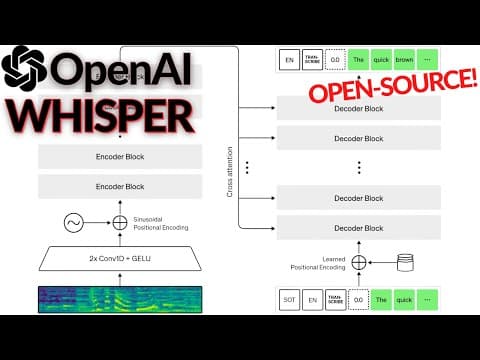
OpenAI's Whisper Model Explained
5:24
Tutorial5:24
OpenAI's Whisper Model Explained
► Get our recent book Building LLMs for Production: https://tinyurl.com/3rbyjmwm The e-book version: https://academy.towardsai.net/courses/buildingllmsforproduction?ref=1f9b29 ► Our new course "From Beginners to Advanced LLM Developer": https://academy.towardsai.net/courses/beginner-to-advanced-llm-dev?ref=1f9b29 Try out AssemblyAI: https://www.assemblyai.com/?utm_source=youtube&utm_medium=social&utm_campaign=whatsai Read more about their auto-chapter tool: https://www.assemblyai.com/docs/audio-intelligence#auto-chapters-summarization References: ►Read the full article: https://www.louisbouchard.ai/whisper/ ► Radford, A., Kim, J.W., Xu, T., Brockman, G., McLeavey, C. and Sutskever, I., Robust Speech Recognition via Large-Scale Weak Supervision. ►Project link: https://openai.com/blog/whisper/ ►Code: https://github.com/openai/whisper ►Google Colab notebook: https://colab.research.google.com/github/openai/whisper/blob/master/notebooks/LibriSpeech.ipynb ►YouTube Whisperer app: https://huggingface.co/spaces/jeffistyping/Youtube-Whisperer ►My Newsletter (A new AI application explained weekly to your emails!): https://www.louisbouchard.ai/newsletter/ Follow me for more AI content: ►Support me on Patreon: https://www.patreon.com/whatsai ►Subscribe to my newsletter: http://eepurl.com/huGLT5 ►Contact: https://www.louisbouchard.ai/contact/ ►My blog: https://www.louisbouchard.ai/ ►Merch: https://whats-ai.creator-spring.com/ Join Our Discord channel, Learn AI Together: ►https://discord.gg/learnaitogether #deeplearning #artificialintelligence #computervision

Who uses it

Real use cases, no hype
AI-Powered Code Generation
Build complex applications or refactor code using GPT models for multi-file, context-aware generation.
Multimodal Content Analysis
Process and understand images, audio, and video for applications like transcription, vision QA, or media search.
Intelligent Agent Systems
Create autonomous agents that can use tools, manage conversation state, and perform multi-step tasks.
Real-Time Voice Interfaces
Develop low-latency voice applications, live translation, or interactive voice agents using Realtime models.
Structured Data Extraction
Convert unstructured text or images into structured JSON output for data pipelines and analysis.
Personalized Model Fine-Tuning
Customize base models with your own data using supervised, reinforcement, or DPO fine-tuning.
Secure Codebase Analysis
Scan repositories for vulnerabilities and security findings using the Codex Security CLI.
What's great
  • Cutting-edge models (GPT-6 Astra) with massive context windows.
  • Comprehensive multimodal support (text, images, audio, video).
  • Flexible deployment: Standard, Batch, Flex, and Fast modes.
  • Advanced agent and tooling framework built into the API.
Technical strengths
  • Native support for reasoning, structured output, and fine-tuning.
  • Responses API enables persistent conversation state and background processing.
  • Sophisticated prompt caching and token counting for cost optimization.
Where it falls short
  • Steep learning curve for API integration and prompt engineering.
  • Premium models (GPT-6 Astra) are expensive for high-volume use.
  • Usage can be throttled; Fast mode is limited for some regions.
  • Dependency on OpenAI's ecosystem and policy changes.
Technical limitations
  • Fine-tuning and reinforcement learning require significant data and compute.
  • WebSocket mode and real-time audio have complex latency and cost trade-offs.
  • Legacy APIs (Assistants, Agent Builder) require migration to newer patterns.
For technical folks

The deep-dive specs

FAQ

Includes technical Q&A
Standard mode is for regular API calls. Batch mode processes queued jobs at a lower cost with higher latency. Fast mode prioritizes your requests for lower latency at a premium price.

Traffic Insights

Monthly Visits

—

October 2026

Growth Rate

0%

vs last month

Dominance

0%

in Coding

Top Country

—

Top Countries Breakdown

—

Growth Trend

Stable

Traffic has remained stable.

Pricing overview
Paid Pricing

Whisper API Pricing

Whisper API uses a paid pricing structure. Real-time rates, custom enterprise quotas, and plan details are managed directly on their official platform.

Check Pricing on Whisper API
Reviews

What the internet actually thinks

Data refreshed weekly. No paid placements.

Trustpilot
Not reviewed yet
G2
G2
Not reviewed yet
C
Capterra
Not reviewed yet
Product Hunt
Not reviewed yet
COMMUNITY COMMENTS

Leave a Comment

Help others make informed decisions. Your honest feedback shapes the community's understanding of this tool.

Tips for commenting

  • •Be specific about features you used
  • •Share real use cases and results
  • •Mention both pros and cons
  • •Keep it honest and constructive
to leave a comment

Your comment is published immediately.

Filter:
Sort:

No comments yet

Be the first to share your experience with this tool.

Alternatives

Not quite the right fit?

Here's what else is out there.