Heptabase

Heptabase

Heptabase is an intelligent, visual knowledge management and note-taking platform built for students, researchers, and lifelong learners. It combines a block-based editor with infinite whiteboards to connect notes, PDFs, YouTube transcripts, and daily journals into a spatial, interconnected knowledge base. Key capabilities include AI-powered research assistance (an AI Tutor), bi-directional links, PDF annotation, and integrations with services like Readwise and Zotero. The platform is designed for deep learning and research, offering features like blazing-fast search over thousands of notes, offline access, and real-time collaboration. It targets individuals and teams who need to synthesize complex information visually, making it a strong alternative to tools like Obsidian, Notion, or Roam Research for visual thinkers and structured learners.

Search
Visit website
Added on
Sep 18, 2026
Monthly Visits
104.3K
Visual PKMAI Research AgentAI TutorWhiteboardsPDF AnnotationBi-directional LinksOfflineMobileCross-platform
Product information

Everything worth knowing about Heptabase

The complete picture — from everyday features to the technical detail builders and IT folks dig for.

Core features

What it actually does

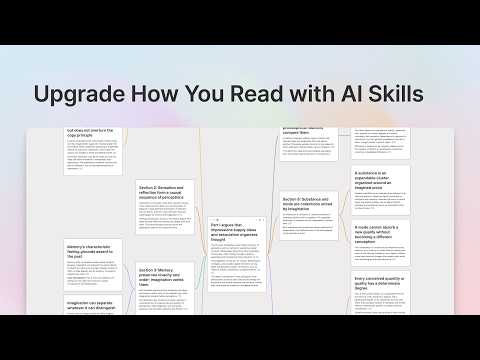
Visual Knowledge Base
Use whiteboards and cards to clarify your thinking and stay in flow. Build a connected knowledge base with all your sources, notes, highlights, and discussions in one place.
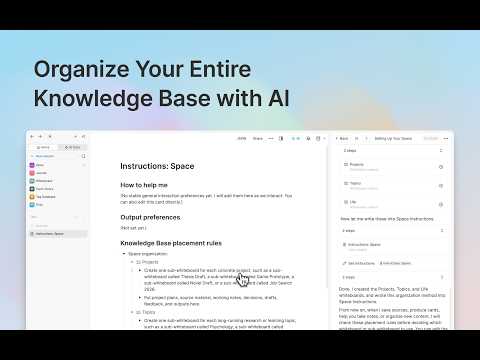
AI Research Agent
Ask AI to explain any sources, take notes, and organize your knowledge base for you. Works with PDFs, YouTube, notes, and journals.
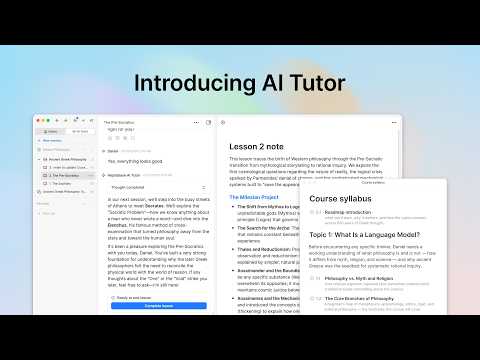
AI Tutor
An AI agent that guides you toward your goals through structured, personalized learning sessions.
Real-time Collaboration
Invite your friends and teammates to collaborate with you for free.
Offline Access
Access all notes and files without an internet connection.
Technical capabilities
Block-Based Editor
A modern editor for creating structured notes with slash commands.
Bi-Directional Links
Connect notes with backlinks for a non-linear, networked thought process.

Who uses it

Real use cases, no hype
Academic Research Synthesis
Annotate papers, map arguments on whiteboards, and build a connected knowledge graph.
Visual Project Planning
Use whiteboards to brainstorm, connect tasks, and see project flow spatially.
Course and Book Study
Structure lessons, take visual notes, and use AI Tutor for guided learning.
Personal Knowledge Management (PKM)
Organize daily journals, highlights, and web clippings into a unified, linked system.
Content Ideation & Outlining
Spatially map out ideas, connections, and narrative flows for writing or presentations.
What's great
  • Powerful visual whiteboard for spatial thinking.
  • Seamless PDF annotation and YouTube transcript integration.
  • Blazing fast search across massive note libraries.
Technical strengths
  • Strong bi-directional linking and backlinking system.
  • Native CLI tool for integration with coding agents.
  • Offline-first architecture with real-time sync.
Where it falls short
  • AI features are credit-gated, not unlimited.
  • Steeper learning curve than simple note apps.
  • Web Clipper and Zotero integrations have setup friction.
Technical limitations
  • Full AI agent functionality requires Premium+ tier.
  • Dependence on proprietary cloud for sync and collaboration.
For technical folks

The deep-dive specs

FAQ

Includes technical Q&A
It combines the spatial, visual thinking of a whiteboard (like Miro) with the linked, block-based note-taking of tools like Obsidian or Roam, aiming to bridge the gap between thinking and organizing.

Traffic Insights

Monthly Visits

104.3K

November 2026

Growth Rate

+13,6%

vs last month

Dominance

0%

in Search

Top Country

Taiwan

36% of traffic

Top Countries Breakdown

Taiwan
36%
United States
16%
Bangladesh
12%
China
5%
Germany
5%

Growth Trend

Rising

Consistent user growth over last 6 months.

Honest pricing

No sneaky tiers, no “contact sales”

Here's who each plan is actually for — and where the hidden charges might hit.

Pro
$8.99/mo

Individuals

  • Unlimited notes
  • whiteboards
  • and tags; Unlimited image uploads; Unlimited collaborator invites; PDF highlights
  • YouTube transcripts
  • etc.; AI agent (Gemini models only); 100 AI credits/month
Premium
Most picked
$17.99/mo

Learners and Researchers

  • Everything in Pro; Unlimited PDF uploads; Unlimited PDF parsing (OCR); Unlimited Q&A with basic AI models; AI agent (GPT
  • Claude
  • Gemini); AI tutor; 1
  • 800 AI credits/month
Premium+
$53.99/mo

Power Users

  • Everything in Premium; 33% discount for AI credits; 8
  • 100 AI credits/month
View Full Plans & Pricing on Heptabase

Official pricing, checkout, and plan upgrades are handled directly on heptabase.com.

Reviews

What the internet actually thinks

Data refreshed weekly. No paid placements.

Trustpilot
Not reviewed yet
G2
G2
Not reviewed yet
C
Capterra
Not reviewed yet
Product Hunt
Not reviewed yet
COMMUNITY COMMENTS

Leave a Comment

Help others make informed decisions. Your honest feedback shapes the community's understanding of this tool.

Tips for commenting

  • •Be specific about features you used
  • •Share real use cases and results
  • •Mention both pros and cons
  • •Keep it honest and constructive
to leave a comment

Your comment is published immediately.

Filter:
Sort:

No comments yet

Be the first to share your experience with this tool.

Alternatives

Not quite the right fit?

Here's what else is out there.