Grain

Grain

Grain is an AI-powered meeting intelligence platform that records, transcribes, and enriches video calls, Slack huddles, and in-person meetings. It generates accurate summaries, action items, and coaching insights, then delivers this structured data to AI tools like Claude, ChatGPT, or custom agents via API and MCP. The platform is designed for sales, customer success, product, and research teams to automate follow-ups, sync insights to CRMs (HubSpot, Salesforce), and create a searchable meeting knowledge base. Key capabilities include bot-less desktop capture, multilingual transcription (130+ languages), collaborative workspaces, and granular sharing controls. It replaces manual note-taking and scattered call data, aiming to save teams 8+ hours per person weekly.

Productivity
Visit website
Added on
Sep 18, 2026
AI NotetakerBot-less transcriptionConversation intelligenceCRM syncMCP ServerMulti-languageSOC 2 audited
Product information

Everything worth knowing about Grain

The complete picture — from everyday features to the technical detail builders and IT folks dig for.

Core features

What it actually does

Universal Meeting Capture
Records video calls, Slack huddles, and in-person meetings with bot-less transcription and optional bot recording for video.
AI Meeting Notes & Transcripts
Generates accurate summaries, action items, and transcripts in 100+ languages, enriched with participant and cross-meeting context.
Team Collaboration & Sharing
Organize into Teams for automatic sharing, create highlight reels, and collaborate on notes and clips within a shared workspace.
CRM & Integration Sync
Integrates with HubSpot, Salesforce, Slack, and Zapier to automatically sync notes, transcripts, and insights to deal records.
Technical capabilities
AI Agent & API Access
Provides a MCP Server, API, and one-click export of enriched Markdown transcripts for use in Claude, ChatGPT, or custom AI tools.
Desktop Capture
Captures computer audio for transcription without needing a meeting bot to join the call.
Must watch videos
Turn your Grain calls into content | Live Webinar
1:01:52
Tutorial1:01:52
Turn your Grain calls into content | Live Webinar
Turn Your Grain Calls Into Content Every call you record is raw material for content. In this live session, Ben from Grain walks through the exact workflow our team uses to turn one recording into a week of assets: a blog post, LinkedIn posts, and polished short-form video, all built with Grain + Claude. You'll see the real process end to end, including a live demo (hiccups and all), the prompts and checks we run to keep AI output authentic, and how we turn plain call clips into professional-looking video. Chapters 0:00 Preview: one call, a week of content 1:15 Welcome & introductions 4:21 What we'll cover today 5:42 Why your calls are your best content source 7:17 What you need to get started 8:44 The 3 checks we run on every AI draft 13:07 What you'll get from this session 15:32 Live demo begins 16:56 Inside the "meeting-to-content" skill 21:36 Running it on a real recording 24:16 Generating the blog + LinkedIn posts 30:25 Optimizing for SEO + AI search (SurferSEO) 39:41 Turning clips into polished video (Remotion) 46:48 Rendering the final LinkedIn-ready video 50:39 Q: recording quality & settings 57:18 Q: will these be built into Grain? 58:34 Audience Q&A + wrap-up Tools mentioned • Grain (recording, transcripts, clips) + the Grain app for Claude/ChatGPT • Remotion for video editing: https://remotion.dev • SurferSEO for SEO/GEO (what we use, not required) Join the community Grain Slack: https://join.slack.com/t/grain-community/shared_invite/zt-3taj7k7hx-ihjsncwRxxNePFIhXStNaA Learn more at https://grain.com Grab this workflow (and more!) at https://grain.com/ai-workflows
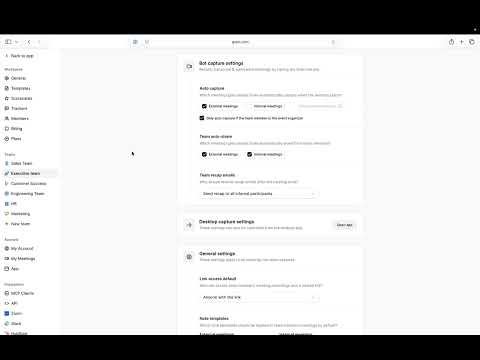
Using teams in Grain
2:06
Tutorial2:06
Using teams in Grain
Teams in Grain help you organize people into groups that match how your company actually works, so recordings, insights, and access line up with the right departments or squads. In this tutorial, we'll walk through how to set up and use teams in Grain. You'll learn how to create a team, add members, control what each team can see and share, and use teams to keep recordings and insights organized as your workspace grows. We'll also cover how teams work alongside your broader workspace settings so access stays clean and nothing gets shared too widely. Whether you're splitting things up by department, region, or function, this video shows you how to use teams to keep a growing workspace organized. Try Grain free: https://grain.com Learn more in the Help Center: https://support.grain.com Subscribe for more walkthroughs and tips on getting the most out of your meetings.
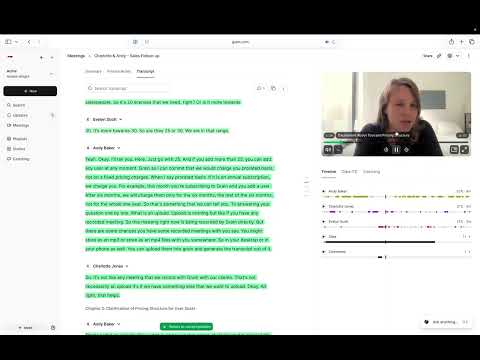
The Grain recording page, explained
3:04
Tutorial3:04
The Grain recording page, explained
The recording page is where you'll spend most of your time in Grain: it's where the video, transcript, notes, and AI summary all live after a meeting wraps. In this tutorial, we'll give you a full tour of the recording page so you know where everything is and how to use it. We'll also point out the smaller features that make reviewing a call faster, so you get everything useful out of a meeting after it ends. Whether you're reviewing your own call or catching up on one you missed, this video shows you how to get the most out of the recording page. Try Grain free: https://grain.com Learn more in the Help Center: https://support.grain.com Subscribe for more walkthroughs and tips on getting the most out of your meetings.

Who uses it

Real use cases, no hype
Sales Coaching & Intelligence
Automatically record calls, analyze talk-to-listen ratios, and coach reps with AI-generated insights and clip sharing.
Customer Success Retrospectives
Capture and share customer feedback, track action items, and sync meeting context directly to CRM deals.
Product & User Research
Conduct interviews without distraction. Grain captures every nuance in 100+ languages, enriching transcripts with notes.
AI Agent Workflow Fuel
Feed enriched meeting data and transcripts to Claude, ChatGPT, or custom agents via one-click export or MCP API.
Remote Team Alignment
Create teams for automatic recording and sharing, ensuring everyone has the same context from standups and syncs.
What's great
  • Generous free plan with unlimited meetings (45-min limit)
  • Clean, bot-less desktop transcription available
  • Simple, transparent pricing without long contracts
  • Rich integrations: Slack, HubSpot, Salesforce, Zapier, API
Technical strengths
  • Provides enriched Markdown transcripts for easy AI consumption
  • Offers a dedicated MCP Server for programmatic transcript querying
Where it falls short
  • Free plan enforces a strict 45-minute meeting duration cap
  • Video recording still requires the in-meeting bot
  • Advanced conversation intelligence is locked behind paid tiers
Technical limitations
  • Enterprise-grade SSO (SAML) requires contacting sales
  • API access for workspace automation starts at the Business plan
For technical folks

The deep-dive specs

FAQ

Includes technical Q&A
The Free plan has a 45-minute meeting limit and 90-day history. Starter removes both, adding advanced AI notes, custom prompts, and unlimited duration/history.

Traffic Insights

Monthly Visits

—

October 2026

Growth Rate

0%

vs last month

Dominance

0%

in Productivity

Top Country

—

Top Countries Breakdown

—

Growth Trend

Stable

Traffic has remained stable.

Honest pricing

No sneaky tiers, no “contact sales”

Here's who each plan is actually for — and where the hidden charges might hit.

Free
Free

Users

    Starter
    $15/mo

    Users

      View Full Plans & Pricing on Grain

      Official pricing, checkout, and plan upgrades are handled directly on grain.com.

      Reviews

      What the internet actually thinks

      Data refreshed weekly. No paid placements.

      Trustpilot
      Not reviewed yet
      G2
      G2
      Not reviewed yet
      C
      Capterra
      Not reviewed yet
      Product Hunt
      Not reviewed yet
      COMMUNITY COMMENTS

      Leave a Comment

      Help others make informed decisions. Your honest feedback shapes the community's understanding of this tool.

      Tips for commenting

      • •Be specific about features you used
      • •Share real use cases and results
      • •Mention both pros and cons
      • •Keep it honest and constructive
      to leave a comment

      Your comment is published immediately.

      Filter by rating:
      Sort by:

      No comments yet

      Be the first to share your experience with this tool.

      Alternatives

      Not quite the right fit?

      Here's what else is out there.