Glassbox

Glassbox

Glassbox is a digital experience intelligence platform that provides comprehensive insights into user behavior across web and mobile applications. It captures 100% of user sessions, offering tools like session replay, struggle and error analysis, funnel optimization, and AI-assisted insights. The platform is designed to help teams identify friction points, boost conversions, and ensure compliance. Key capabilities include real-time struggle detection, customer journey mapping, performance analytics, and automated digital record-keeping for security. It targets enterprises in regulated industries like financial services and insurance, as well as marketing, product, and CX teams focused on optimizing digital journeys and mitigating risk.

Analytics
Visit website
Added on
Sep 22, 2026
Session ReplayJourney AnalyticsFunnel AnalysisError AnalysisMobile AnalyticsTagless CaptureAI InsightsOn-Prem / Cloud
Product information

Everything worth knowing about Glassbox

The complete picture — from everyday features to the technical detail builders and IT folks dig for.

Core features

What it actually does

Session Replay
Instant replay of any digital session, with 100% capture for production operations or 10% for marketing/product use cases.
Customer Journey Analytics
Discover the Augmented Journey Map™ to visualize and analyze the complete user journey across channels.
Struggle & Error Analysis
Find and eliminate digital friction by spotting user pain points and technical errors.
Funnel Analysis
Measure conversions and their impact on business outcomes.
Technical capabilities
Tagless Data Capture
Collects user interaction data without requiring manual tagging or implementation effort.
AI Inside (Glassbox Insights Assistant)
AI-assisted insights for automated analysis and recommendations.
Must watch videos
Transform User Insights with GIA: AI-Powered Session Analysis
1:47
Tutorial1:47
Transform User Insights with GIA: AI-Powered Session Analysis
Meet GIA, the AI-powered tool transforming how organizations understand user behavior. Building on its revolutionary session search capabilities, GIA now delivers quick, concise overviews of user sessions, spotlighting key interactions and patterns. With these insights, teams can act faster, make informed decisions, and enhance the customer experience. Watch how Glassbox's GIA drives smarter, data-driven decisions for businesses like yours!
XAutoML Glass Box AI: Student-Friendly Explained
8:54
Tutorial8:54
XAutoML Glass Box AI: Student-Friendly Explained
Confused by XAutoML Glass Box AI for your class or project? This video cuts through the jargon with a step-by-step breakdown—no fluff, just clear, actionable insights for students. Perfect for exam prep, homework, or quick study sessions under 5 minutes. Tangled up in AI concepts? We simplify how XAutoML works, focusing on practical use cases and key principles that matter most for your assignments or tech projects. Crash-course style, built for speed. #XAutoML #GlassBoxAI #MachineLearning #ExamPrep #StudentStudy #AIExplained #TechTutorial #DataScience #HomeworkHelp
Mobile Mastery with Glassbox: Unlock Essential Insights for Native Apps
2:43
Tutorial2:43
Mobile Mastery with Glassbox: Unlock Essential Insights for Native Apps
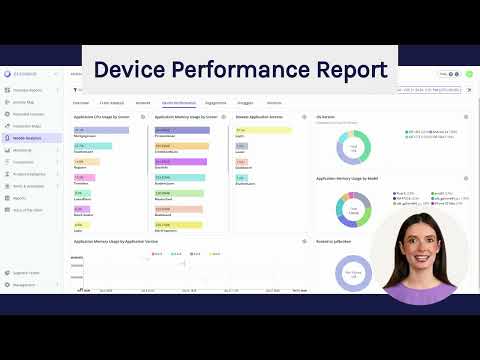
Discover the power of Glassbox for native mobile apps. In this video, we’ll walk you through the 7 essential mobile reports, showcasing how they provide actionable insights for mobile optimization. Plus, see how our Glassbox Intelligence Assistant (GIA) can summarize any mobile report and answer your questions using natural language for unparalleled ease and efficiency.

Who uses it

Real use cases, no hype
Conversion Rate Optimization
Identify and remove friction in user journeys to maximize sign-ups and purchases.
Customer Support & Case Resolution
Use session replays to instantly understand customer-reported issues.
Fraud Prevention & Compliance
Monitor sessions in real-time for suspicious activity and ensure digital record-keeping.
Mobile App UX Analysis
Diagnose crashes, performance issues, and user drop-off in native apps.
Website Performance Monitoring
Correlate technical metrics (load times) with user behavior and struggle scores.
Product Adoption Tracking
Analyze feature usage and user flows to improve product onboarding.
Accessibility Auditing
Turn user session data into actionable insights for WCAG compliance.
What's great
  • Full-session replay with 100% capture rate.
  • Powerful struggle & error analysis.
  • Excellent mobile app analytics (G2 top-rated).
  • Strong focus on proactive & preventive CX, not just reporting.
Technical strengths
  • Tagless data capture eliminates instrumenting burdens.
  • AI-powered Insights Assistant for quick anomaly detection.
  • Robust privacy & security controls for regulated industries.
Where it falls short
  • Pricing is opaque and requires sales contact.
  • Primarily enterprise-focused; overkill for small apps.
  • Session replay can be a privacy minefield if misconfigured.
  • Complex feature set has a steep learning curve.
Technical limitations
  • Data retention limits per plan can be restrictive.
  • On-prem/hybrid deployment adds infra complexity.
  • Deep integration with existing stacks may require dev work.
For technical folks

The deep-dive specs

FAQ

Includes technical Q&A
It's the combination of full 100% session replay with built-in AI-powered struggle analysis and a strong focus on security/compliance for financial services.

Traffic Insights

Monthly Visits

—

November 2026

Growth Rate

0%

vs last month

Dominance

0%

in Analytics

Top Country

—

Top Countries Breakdown

—

Growth Trend

Stable

Traffic has remained stable.

Pricing overview
Paid Pricing

Glassbox Pricing

Glassbox uses a paid pricing structure. Real-time rates, custom enterprise quotas, and plan details are managed directly on their official platform.

Check Pricing on Glassbox
Reviews

What the internet actually thinks

Data refreshed weekly. No paid placements.

Trustpilot
Not reviewed yet
G2
G2
Not reviewed yet
C
Capterra
Not reviewed yet
Product Hunt
Not reviewed yet
COMMUNITY COMMENTS

Leave a Comment

Help others make informed decisions. Your honest feedback shapes the community's understanding of this tool.

Tips for commenting

  • •Be specific about features you used
  • •Share real use cases and results
  • •Mention both pros and cons
  • •Keep it honest and constructive
to leave a comment

Your comment is published immediately.

Filter:
Sort:

No comments yet

Be the first to share your experience with this tool.

Alternatives

Not quite the right fit?

Here's what else is out there.