Elephas

Elephas

Elephas is a private AI assistant for Mac and Windows that answers questions from your own documents instead of the internet. Add PDFs, Word files, spreadsheets, slide decks and scanned pages; Elephas indexes them locally on your machine and returns answers with citations pointing to the exact page, slide or paragraph. Before anything leaves your computer, names, emails and phone numbers are replaced with placeholders and restored in the answer. You choose where answers are generated: the built-in Elephas AI gateway, your own OpenAI/Claude/Gemini API key, or a fully offline on-device model. Brains can be shared with a team through end-to-end encrypted sync. Built for lawyers, accountants, consultants, financial advisors and researchers who handle confidential client work and need to show where every answer came from.

Productivity
Visit website
Added on
Nov 4, 2026
Mac & WindowsLocal indexingCitations with pagePII redactionBYO API keyOn-device modelTeam BrainsE2E encrypted sync6 languagesScanned PDF support
Product information

Everything worth knowing about Elephas

The complete picture — from everyday features to the technical detail builders and IT folks dig for.

Core features

What it actually does

Answers with sources
Ask a question in plain language and Elephas searches your own files, reads the relevant passages, and writes an answer. Every answer cites the file and the page, slide, sheet, or paragraph so you can open the source and verify the quoted passage instead of trusting a chatbot.
Brains from your own documents
Drop in files or whole folders — PDFs, Word, PowerPoint, Excel, Markdown, CSV, HTML, EPUB, scanned pages, even a web page by URL — and group them into a searchable Brain. Answers come from your documents, not the internet.
Personal details hidden before cloud AI
Names, email addresses, and phone numbers are replaced with placeholders on your computer before a question leaves it, then restored in the answer. You can see exactly what was hidden under every answer and add your own protected names. Works in all six supported languages.
You choose where answers are generated
Three modes: included Elephas AI through the Elephas gateway, your own API key (OpenAI, Claude, Gemini) going straight to your provider, or a local model that runs on your computer and sends nothing anywhere.
Team Brains with roles
Share a Brain with your firm's contracts, policies, and client files. Invite by email with manager, contributor, and reader roles; chats stay private to each person; the owner sets one AI policy and usage caps with pooled AI usage across seats. $29 per person per month, no minimum team size.
Technical capabilities
Local indexing and encrypted local store
Documents stay stored on your computer. The search index and chats live in an encrypted local database, and search itself is built and run on the machine — no upload required to query your files.
End-to-end encrypted sync
Optional on Professional and Team. Files are encrypted on your computer before upload, downloaded and decrypted only on your own machines (or, for a Team Brain, on the computers of the people it is shared with), each of which builds its own index. Servers hold only ciphertext. Requests to cloud AI are not end-to-end encrypted — only sync is.
Must watch videos
NotebookLM vs Elephas – Why Elephas Is the Better Choice
2:55
Comparison2:55
NotebookLM vs Elephas – Why Elephas Is the Better Choice
NotebookLM has been getting a ton of attention lately – people are calling it the future of research. But is it really the best option for knowledge workers? In this video, we put NotebookLM and Elephas head-to-head to see which tool actually makes sense for real workflows. We’ll compare features, test cases, pricing, and overall value so you can decide which AI research assistant fits your needs. NotebookLM’s podcast generation is impressive, but Elephas brings offline mode, multiple AI model support, automation workflows, and deep integrations with tools like Notion and Obsidian. If you’re hitting file limits with NotebookLM or need a tool that goes beyond just chatting with documents, Elephas might be the smarter choice. Watch till the end for the full breakdown. Try Elephas for free here 👉 elephas.app #Elephas #NotebookLM #AIResearchTools
I Tested Claude Projects vs Elephas - Here's What I Found
6:22
Comparison6:22
I Tested Claude Projects vs Elephas - Here's What I Found
I tested two popular AI tools that work with your documents - Claude Projects and Elephas. Both help you chat with your files, but which one is actually better? In this video, I compare: - How well they explain complex topics - Their ability to find specific information - Pricing and value for money - Features and capabilities What I Found: Claude Projects is simple and good for basic tasks, but costs $20/month and only works with a few files. Elephas costs less at $14.99/month, works with thousands of files, has writing tools, automation features, and can run offline on your Mac. Key Test Results: Both tools found citations correctly, but Elephas gave much more detailed explanations for research work. Bottom Line: For most people, Elephas is the better choice - it's cheaper, more private, and has way more features. Hashtags: #ClaudeProjects #Elephas #AItools #DocumentChat #ProductivityTools #AIcomparison #MacApps #ResearchTools #AIwriting #TechReview #OfflineAI #DocumentAnalysis #AIproductivity #TechComparison #AIassistant
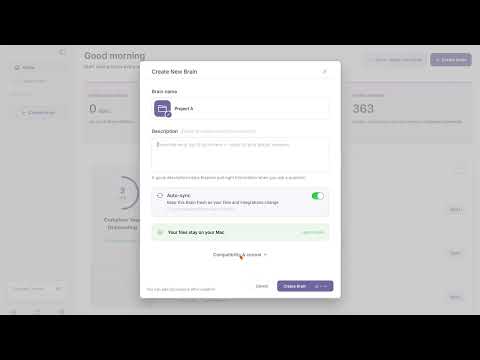
Create Your First Super Brain
1:35
Tutorial1:35
Create Your First Super Brain
🧠 Turn your scattered files into a genius-level knowledge system! Learn how to create your first Super Brain in Elephas - the smart organizational folders that make your AI assistant actually SMART about YOUR data! 🚀 ⚡ What you'll discover: Transform chaos into organized knowledge Create multiple brains for work, personal, projects 4-step setup process (it's ridiculously easy!) Pro tips for maximum productivity Make your AI assistant truly personal From scattered notes to super intelligent organization - your knowledge deserves better than random folders! Super Brains = Your personal knowledge powerhouse 💪 Ready to organize like a genius? Create your first Super Brain today! #SuperBrain #ElephasAI #KnowledgeManagement #Productivity #AIAssistant #Organization #MacAI #ProductivityHacks #WorkflowOptimization #SmartOrganization #DigitalOrganization

Who uses it

Real use cases, no hype
Contract Review
Ask what notice period you agreed to and get the exact clause, page, and document cited back.
Client File Q&A
Index a folder of client PDFs, Word docs, and spreadsheets, then query it in plain language.
Team Knowledge Base
Share a Brain of firm policies and precedents with role-based access and private per-person chats.
Cross-Language Search
Ask in English, retrieve the passage from a German or Japanese contract, cited in the original language.
Confidential Research
Work through sensitive notes and reports without pasting them into a public chatbot.
Air-Gapped Answers
Run the on-computer model and generate answers with nothing leaving the machine at all.
Policy & Compliance Lookup
Turn internal policy binders and scanned memos into a searchable, auditable Q&A source.
What's great
  • Documents never leave your computer
  • Every answer cites the file and page number
  • Personal details masked before anything goes to cloud AI
  • Native Mac and Windows app, not a browser tab
  • Ask in English, get cited answers from German or Japanese files
Technical strengths
  • On-device search index — retrieval runs locally, not on a server
  • Bring your own OpenAI/Claude/Gemini key; requests bypass Elephas entirely
  • Local model option sends literally nothing off the machine
  • Team sync is end-to-end encrypted; servers hold only ciphertext
Where it falls short
  • No mobile app — desktop only
  • No agents, no web browsing, no app automation — by design
  • Only six languages supported
  • Included AI usage is capped monthly and does not roll over
  • No self-serve billing — cancel or change plan by emailing support
Technical limitations
  • PII detection can miss things; it is not a guarantee
  • Cloud AI calls are not end-to-end encrypted — only sync is
  • Requires macOS 14+ on Apple Silicon; Intel Macs are out
  • Each synced computer downloads files and rebuilds its own index
For technical folks

The deep-dive specs

Platform
macOS 14 or later on Apple Silicon; Windows 10 or 11 (64-bit)
Deployment
Desktop app for Mac and Windows (no mobile app for the new Elephas)
Indexing
Local, on-computer indexing and search; index and chats in an encrypted database
Sync encryption
End-to-end encrypted (files encrypted before upload, decrypted only on client devices)
AI options
Elephas AI gateway, own API key (OpenAI, Claude, Gemini), or on-computer local model
Supported languages
English, German, Spanish, French, Japanese, Chinese (search and PII detection)
Supported files
PDF (including scanned), Word, PowerPoint, Excel, Markdown, text, CSV, HTML, EPUB, images of text, web pages by URL

FAQ

Includes technical Q&A
Your documents stay stored on your computer. With Elephas AI or your own API key, only your question and the relevant passages go to the model — with personal details hidden first. With the on-computer model, nothing is sent anywhere.

Traffic Insights

Monthly Visits

—

November 2026

Growth Rate

0%

vs last month

Dominance

0%

in Productivity

Top Country

—

Top Countries Breakdown

—

Growth Trend

Stable

Traffic has remained stable.

Honest pricing

No sneaky tiers, no “contact sales”

Here's who each plan is actually for — and where the hidden charges might hit.

Personal
$19/mo

Individuals

  • Private Brains from your own documents; Answers with sources; Personal details hidden before cloud AI; Elephas AI included; Your own API key or an on-computer model; 1 computer
Professional
Most picked
$29/mo

Professionals

  • Everything in Personal; 2x the included AI usage; 3 computers; Optional end-to-end encrypted sync between your computers
Team
$29/mo

Teams

  • Shared Team Brains; Invite by email with manager
  • contributor
  • and reader roles; Private chats for every member; One AI policy and usage caps for the team; Included AI usage pooled across seats; End-to-end encrypted team sync
View Full Plans & Pricing on Elephas

Official pricing, checkout, and plan upgrades are handled directly on elephas.app.

Reviews

What the internet actually thinks

Data refreshed weekly. No paid placements.

Trustpilot
Not reviewed yet
G2
G2
Not reviewed yet
C
Capterra
Not reviewed yet
Product Hunt
Not reviewed yet
COMMUNITY COMMENTS

Leave a Comment

Help others make informed decisions. Your honest feedback shapes the community's understanding of this tool.

Tips for commenting

  • •Be specific about features you used
  • •Share real use cases and results
  • •Mention both pros and cons
  • •Keep it honest and constructive
to leave a comment

Your comment is published immediately.

Filter:
Sort:

No comments yet

Be the first to share your experience with this tool.

Alternatives

Not quite the right fit?

Here's what else is out there.