Clipdrop

Clipdrop

Clipdrop is a comprehensive AI-powered visual editing platform developed by InitML, now part of Jasper. It provides a suite of tools for generating and editing images, including background removal, object removal (Cleanup), text removal, image upscaling, relighting, and text-to-image generation. Its core innovation is a seamless 'reality to digital' workflow, allowing users to capture objects with a phone camera and instantly have them available as cut-outs on a desktop via apps or plugins for Figma, Photoshop, and PowerPoint. Key capabilities include highly accurate background removal with complex edges, AI-powered inpainting, and high-resolution image generation. It targets professionals, marketers, designers, and developers who need to create polished visuals quickly without deep technical expertise in traditional editing software. The platform is accessible via web apps, mobile apps, and a flexible API for integration.

Design & Creative
Visit website
Added on
Jul 9, 2026
Monthly Visits
5.5M
Background RemovalText-to-ImageObject RemovalImage UpscalerRelight ToolUncropText RemoverAPI Access
Product information

Everything worth knowing about Clipdrop

The complete picture — from everyday features to the technical detail builders and IT folks dig for.

Core features

What it actually does

Universal AI Image Editing Suite
A unified platform offering text-to-image, background removal, object removal (Cleanup), relighting, upscaling, uncropping, and text removal, eliminating the need for multiple fragmented tools.
Physical-to-Digital Capture Workflow
Unique 'Copy/Paste for Reality' feature: capture objects or documents with your phone camera and get a perfectly cut-out, high-resolution version instantly on your desktop or directly in design software via plugins.
Professional-Grade Output
Generates and processes images to high resolutions suitable for professional print and web use. Upscaler can reconstruct details, and tools support batch processing for efficiency.
Seamless Software Integration
Native plugins for industry-standard tools like Figma, Adobe Photoshop, and PowerPoint, allowing AI-powered edits directly within the creative workflow without switching contexts.
Technical capabilities
High-Precision Edge Detection Engine
Leverages proprietary models (derived from the 'Cali' app tech) for exceptional accuracy in background removal, especially for complex edges like hair, fur, and transparent objects.
Context-Aware Inpainting (Cleanup)
Advanced AI inpainting model that removes objects, text, or defects by intelligently filling the space based on surrounding image context, often outperforming basic generative fill tools.
Must watch videos
How to Use Clipdrop Ai ( Full Tutorial )│Ai Hipe
6:01
Tutorial6:01
How to Use Clipdrop Ai ( Full Tutorial )│Ai Hipe
Welcome to How to Use Clipdrop Ai In this tutorial, we'll unveil the secrets of using Clipdrop AI to elevate your creative projects. Say goodbye to traditional design constraints – Clipdrop AI empowers you to seamlessly incorporate real-world objects into your digital canvas. Our visual guide will walk you through the step-by-step process, from installing the app to harnessing its cutting-edge features. Learn how to effortlessly transfer physical images to your digital workspace, opening up a world of possibilities for graphic designers, artists, and content creators alike. Whether you're a seasoned professional or a creative enthusiast, Clipdrop AI is a game-changer. ✅ Click the link to Get UP 200 000+ ChatGPT Prompts With 30% Exclusive Discount At Checkout With CODE AiHipe30 : https://shorturl.at/FSZ90 ✅Thank you for watching , Click here to start using ✅Subscribe to AI HIPE : https://bit.ly/3BQdvKQ ✅Murfai : https://get.murf.ai/hffg6cbgfbzp ✅Watch the next video ✅For Jasper Free Trail and Special Offer : GET 10,000 bonus credits when YOU Sign Up with the link below. https://shorturl.at/fkvVY ✅Copyai : https://shorturl.at/tDH23 ✅Pictory (Text to Video) : https://pictory.ai?ref=for21 Promo Code: for21 #aitools #ai
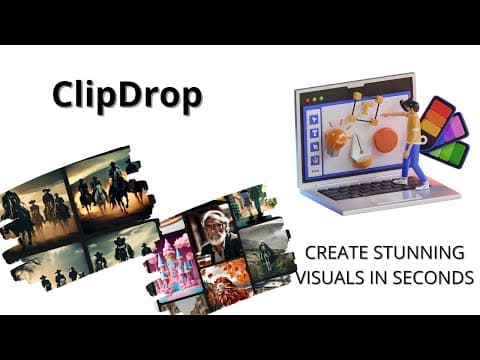
Create Stunning Visuals in Seconds with ClipDrop AI-Powered Platform | ClipDrop Demo
2:25
Tutorial2:25
Create Stunning Visuals in Seconds with ClipDrop AI-Powered Platform | ClipDrop Demo
In this AI Demo, we'll be showcasing ClipDrop, a revolutionary platform that allows creators to upscale their images by 2x or 4x in seconds using artificial intelligence. ClipDrop's AI can also remove noise and recover beautiful details, and replace backgrounds in images. Take advantage of the ultimate ecosystem of apps, plugins and resources for all creators, powered by artificial intelligence. For more AI Demos like this one, check out https://www.aidemos.com. 💻 AIDemos.com is your go-to directory for 🎥 video demos of the latest 🤖 AI tools, technologies, and 💰 SaaS solutions. Our goal is to educate and inform anyone interested in AI about the 🚀 potential of what's possible with AI. Explore our directory of AI demos and discover the 🔥 power of AI. #AIDemos #ClipDrop #AIpowered #creators #visuals #upscale #noisereduction #backgroundreplacement #visuals #aidemos
Unlock the Power of Clipdrop: A Comprehensive Guide # AI Tools # Guide
2:44
Tutorial2:44
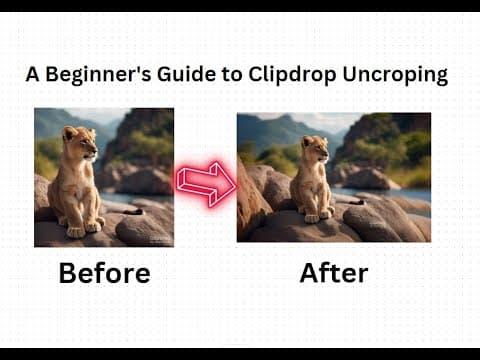
Unlock the Power of Clipdrop: A Comprehensive Guide # AI Tools # Guide
Hey there, fellow tech enthusiasts! Today, I'm super excited to introduce you to an absolute game-changer in the world of image editing – Clipdrop Uncrop! This incredible AI tool is here to revolutionize the way you edit your photos. Say goodbye to those frustrating moments when you accidentally crop out something important. With Clipdrop Uncrop, you can effortlessly restore any cropped area in your images with just a few clicks. It's like magic! Whether you're a professional photographer or just love capturing precious moments, Clipdrop Uncrop is a must-have tool that will take your editing skills to the next level. Don't miss out on this amazing innovation!

Who uses it

Real use cases, no hype
E-commerce Product Photography
Batch remove backgrounds from hundreds of product images for online listings.
Graphic Design & Mockups
Quickly capture real-world objects and paste them directly into design software.
Social Media Content Creation
Generate eye-catching visuals, remove text/objects, and upscale images for posts.
Marketing Material Production
Relight product shots and create high-resolution branded imagery rapidly.
Photo Editing & Cleanup
Remove unwanted people, defects, or text from images with AI-powered inpainting.
API Integration for Apps
Embed background removal, upscaling, or relighting into custom applications.
Rapid Concept Prototyping
Turn sketches into polished images and experiment with visual ideas.
What's great
  • Unmatched mobile-to-desktop reality capture workflow
  • Superior accuracy with complex edges like hair and fur
  • Deep plugins for Figma, Photoshop, and PowerPoint
Technical strengths
  • High-resolution output suitable for professional print/web
  • Unified platform consolidates multiple AI imaging tasks
  • Highly optimized API with pay-as-you-go credit system
Where it falls short
  • Pro tier pricing is steep for casual users
  • Free tier is heavily limited with watermarks
  • Customer support can be slow or unresponsive
Technical limitations
  • API calls consume varying credits per feature
  • Relies on proprietary models, less customizable
  • Batch processing requires higher-tier plans
For technical folks

The deep-dive specs

Core Technology
Proprietary AI models for segmentation, inpainting, and generation
Output Resolution
Up to 4K (via upscaler) and high-res commercial-ready assets
Integration
Native plugins for Figma, Photoshop, PowerPoint; REST API
Primary Workflow
Mobile capture to desktop/cloud synchronization

FAQ

Includes technical Q&A
Yes, there is a free tier with limited credits per 24 hours for basic tasks like background removal and cleanup. For unlimited, high-resolution, and commercial use, a paid Pro plan is required.

Traffic Insights

Monthly Visits

5.5M

September 2026

Growth Rate

0%

vs last month

Dominance

0,23%

in Design & Creative

Top Country

India

14% of traffic

Top Countries Breakdown

India
14%
Bangladesh
12%
United States
11%
Brazil
6%
Russian Federation
4%

Growth Trend

Stable

Traffic has remained stable.

Honest pricing

No sneaky tiers, no “contact sales”

Here's who each plan is actually for — and where the hidden charges might hit.

Free
Free

Individuals

  • Text to Image (Standard)
  • Uncrop (Standard)
  • Background Removal (20/day)
  • Image Upscaler x2 (20/day)
  • Cleanup (20/day)
  • Relight (20/day)
  • Text Remover (50/day)
Pro
Most picked
$15/mo

Professionals & Power Users

  • Skip Queue on all tools
  • Text to Image (1000/day)
  • Uncrop (1000/day)
  • High-Res Background Removal (1000/day)
  • High-Res Image Upscaler x16 (1000/day)
  • High-Res Cleanup (1000/day)
  • High-Res Relight (1000/day)
API (Pay-As-You-Go)
Usage-based/mo

Developers & Businesses

  • Programmatic access to all AI models
  • Credit-based pricing (e.g.
  • 1 credit per bg removal)
  • Scalable for high-volume automation
  • Direct integration into apps/products
Reviews

What the internet actually thinks

Data refreshed weekly. No paid placements.

Trustpilot
Not reviewed yet
G2
G2
Not reviewed yet
C
Capterra
Not reviewed yet
Product Hunt
Not reviewed yet
COMMUNITY COMMENTS

Leave a Comment

Help others make informed decisions. Your honest feedback shapes the community's understanding of this tool.

Tips for commenting

  • Be specific about features you used
  • Share real use cases and results
  • Mention both pros and cons
  • Keep it honest and constructive
Sign in to leave a comment

Your comment will be published after moderation

Filter by rating:
Sort by:

No comments yet

Be the first to share your experience with this tool.

Alternatives

Not quite the right fit?

Here's what else is out there.

Detail tags
Found via these searches
#AI#ImageEditing#BackgroundRemoval#NoCode#Design#Productivity#APIIntegration