Applitools

Applitools

Applitools provides an AI-driven platform for end-to-end visual and functional testing of web and mobile applications. Its core product, Applitools Eyes, uses proprietary Visual AI to validate UIs with high accuracy, eliminating false positives and catching regressions across browsers and devices. The platform also offers Applitools Autonomous, a no-code solution for test creation using NLP and AI-augmented recording. Designed for developers, QA engineers, and digital leadership, it integrates with existing test frameworks, CI/CD pipelines, and design tools like Figma and Storybook. It provides cross-browser and cross-device testing on a cloud-based grid, self-healing tests, and root cause analysis to maintain test stability and accelerate release cycles.

Automation
Visit website
Added on
Sep 16, 2026
Visual AICross-browserNo-code testingSelf-healingMCP serverEnterprise SSO
Product information

Everything worth knowing about Applitools

The complete picture — from everyday features to the technical detail builders and IT folks dig for.

Core features

What it actually does

Visual AI Validation
Catch UI regressions with human-eye precision using Visual AI, trained on billions of images to eliminate false alarms.
Cross-Browser & Device Testing
Test across a vast network of browsers and devices using the Ultrafast Grid for consistent visual ground truth.
Autonomous Test Creation
Create, execute, and analyze functional, visual, and API tests with AI-augmented recording and NLP authoring in a no-code platform.
Self-Healing Tests
Automatically maintain tests and fix flaky pipelines as UI elements change, reducing maintenance overhead.
Technical capabilities
MCP Server for AI Agents
Provides a deterministic language model and visual ground truth integration for AI agents, catching UI hallucinations in agentic workflows.
Deterministic Language Model (DLM)
A core AI architecture designed for zero-variance, reproducible governance guardrails, distinct from probabilistic LLMs.
Must watch videos
Applitools Visual AI MCP server tools for the agentic SDLC
2:02
Tutorial2:02
Applitools Visual AI MCP server tools for the agentic SDLC
AI coding agents make changes fast, but ensuring they don't break unseen UI elements is a major challenge. See how combining *Claude Code* with the new *Applitools Eyes MCP server* allows you to catch unexpected visual regressions, optimize token spend, and automate UI fixes. *What's in this video:* • Targeted Modifications: Instructing Claude to remove an App Store badge from a local Wikipedia clone running Playwright tests across multiple viewports. • Context & Token Efficiency: How the Applitools Eyes MCP server offloads visual comparison data, saving valuable token spend and context budget. • Automated Bug Catching: Applitools flagging an unexpected regression - a cut-off search button on smaller viewports. • AI Self-Correction: Watching Claude cross-reference the visual diff with the codebase to locate and fix the CSS bug automatically. • Seamless Verification: Reviewing test runs via direct Applitools dashboard links before setting new visual baselines. *Timestamps* 0:00 - Intro: The AI Validation Problem 0:23 - Setup: Wikipedia Clone & Playwright Tests 0:28 - Prompting Claude Code to Remove UI Badge 0:40 - Visual Diff Comparison & Saving Token Spend 0:54 - Catching an Unexpected Mobile Layout Bug 1:08 - Autonomous CSS Fix & Baseline Verification *Resources & Links* • Read the Launch Announcement: https://applitools.com/blog/probabilistic-validation-gap-agentic-sdlc/?utm_source=youtube&utm_medium=organic-social&utm_campaign=260915-launch • What's New and Eyes MCP Server Documentation: https://applitools.com/platform/whats-new/?utm_source=youtube&utm_medium=organic-social&utm_campaign=260915-launch • See Applitools CTO Adam Carmi demo the features (Live Sept 24 or On-Demand after): https://applitools.com/platform/whats-new/?utm_source=youtube&utm_medium=organic-social&utm_campaign=260924-wbn-product-pulse-mcp
Why Playwright Fixtures Crush 1,000-Line Selenium Page Objects
5:17
Tutorial5:17
Why Playwright Fixtures Crush 1,000-Line Selenium Page Objects
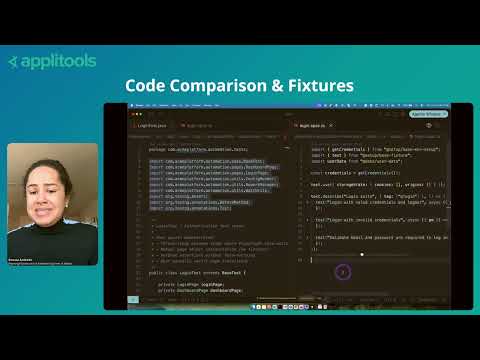
See how Playwright native fixtures cut boilerplate code volume by over 60% compared to legacy Selenium setups. From Moving from Selenium to Playwright, featuring Renata Andrade (Playwright Instructor & Adobe Software Engineer). Watch the full session here: https://applitools.info/xvs In this direct code walkthrough, Renata compares a 116-line Selenium login file against a clean 40-line Playwright implementation. Learn how switching to fixtures removes setup overhead and improves maintainability. #playwrighttesting #Selenium #CodeQuality #TestAutomation #Applitools #DevOps
How To Force GitHub Copilot To Write Clean Automation Code
3:56
Tutorial3:56
How To Force GitHub Copilot To Write Clean Automation Code
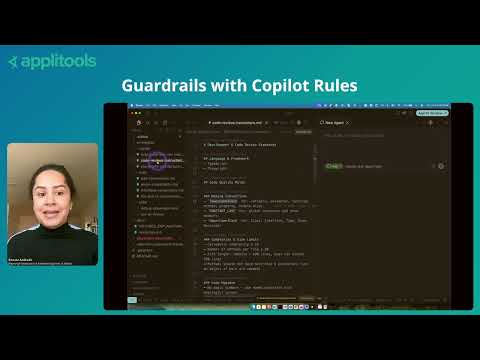
Turn GitHub Copilot into an automated code reviewer that enforces your team's architectural standards. From Moving from Selenium to Playwright, featuring Renata Andrade (Playwright Instructor & Adobe Software Engineer). Watch the full session here: https://applitools.info/xvs See how defining custom rules, skills, and instructions in your repository forces AI coding assistants to generate clean, framework-compliant Playwright tests. #GitHubCopilot #AI #Playwright #Applitools #DevOps #SoftwareEngineering

Who uses it

Real use cases, no hype
AI Code Validation
Add deterministic visual guardrails to verify code from LLM agents like Copilot or Claude.
Cross-Browser/Device Testing
Run visual tests across thousands of browser/viewport combinations via the Ultrafast Grid.
No-Code QA Testing
Empower manual testers to author and run tests using plain English descriptions.
Component Library Testing
Validate Storybook components and design systems in isolation before integration.
Figma to Code Verification
Compare implemented UIs directly against Figma designs to catch deviations.
Accessibility Compliance
Automatically detect WCAG violations as part of your visual testing suite.
PDF and Document Testing
Visually validate rendered PDF documents for accurate layout and content.
What's great
  • Detects real visual UI bugs, not just pixel diffs
  • Cuts regression testing time dramatically
  • Excellent cross-browser/device coverage via Ultrafast Grid
  • No-code test creation for QA via Autonomous
Technical strengths
  • Proprietary Visual AI trained on 4B+ images for high accuracy
  • Deterministic Language Model (DLM) for reliable NLP test authoring
  • Self-healing tests adapt to minor UI changes automatically
Where it falls short
  • High cost barrier for small teams or projects
  • Complex setup and learning curve for full integration
  • Can generate false positives for intentional dynamic content
  • Tightly coupled to its own SaaS/cloud infrastructure
Technical limitations
  • Visual AI ignores functional logic, only validates UI rendering
  • Baseline management becomes critical and can be complex at scale
For technical folks

The deep-dive specs

AI Architecture
Deterministic Language Model (DLM) paired with Visual AI
Training Data
4 billion proprietary training images
Compliance
ISO 27001 and SOC 2 Type II
Deployment Options
SaaS (cloud), Dedicated cloud (AWS/Azure/GCP), On-premises

FAQ

Includes technical Q&A
Page testing validates full screens and user flows in real browsers. Component testing isolates individual UI elements (buttons, modals) in design systems like Storybook for early lifecycle validation.

Traffic Insights

Monthly Visits

—

October 2026

Growth Rate

0%

vs last month

Dominance

0%

in Automation

Top Country

—

Top Countries Breakdown

—

Growth Trend

Stable

Traffic has remained stable.

Honest pricing

No sneaky tiers, no “contact sales”

Here's who each plan is actually for — and where the hidden charges might hit.

Starter
Most picked
$667/mo

Teams

  • Unlimited users
  • 100000 component checkpoints or 1
  • 000 page checkpoints
  • Visual validation with Visual AI
  • Visual AI MCP server
  • Figma design integration
Professional
Custom

Teams

  • Unlimited Users
  • Starts at 150 active pages / 1
  • 500 components
  • Unlimited executions
  • Unlimited browsers and devices per Visual AI check
  • AI-driven functional testing
  • NLP-based test authoring
Enterprise
Custom

Enterprise

  • Unlimited Users
  • Starts at 350 active pages / 1
  • 500 components
  • Unlimited executions
  • Dedicated / private cloud included
  • Single sign-on (SSO / SAML) included
  • Custom SLAs (99.99% uptime guarantee)
View Full Plans & Pricing on Applitools

Official pricing, checkout, and plan upgrades are handled directly on applitools.com.

Reviews

What the internet actually thinks

Data refreshed weekly. No paid placements.

Trustpilot
Not reviewed yet
G2
G2
Not reviewed yet
C
Capterra
Not reviewed yet
Product Hunt
Not reviewed yet
COMMUNITY COMMENTS

Leave a Comment

Help others make informed decisions. Your honest feedback shapes the community's understanding of this tool.

Tips for commenting

  • •Be specific about features you used
  • •Share real use cases and results
  • •Mention both pros and cons
  • •Keep it honest and constructive
to leave a comment

Your comment is published immediately.

Filter by rating:
Sort by:

No comments yet

Be the first to share your experience with this tool.

Alternatives

Not quite the right fit?

Here's what else is out there.